Audio equipment puts a specific set of constraints on display selection that general-purpose embedded display guides do not cover well. The front panel dimensions are often fixed by mechanical standards or existing product lines. The host system is frequently a full SBC or x86 board rather than a microcontroller. The product lifecycle can run a decade or longer. And the end customer, whether a studio engineer or a live sound technician, expects a display that reads clearly under variable and sometimes harsh lighting conditions.
This article covers the display-related issues that come up repeatedly in audio equipment projects, based on what we see from mixer, digital instrument, and audio processor manufacturers. For a general introduction to TFT LCD module specifications, see our complete TFT LCD module guide.
Why interface choice is the first decision, not the last
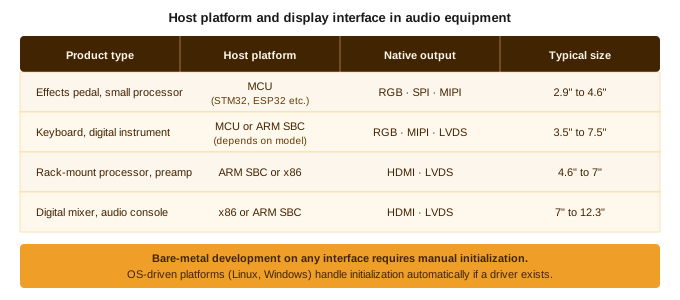
Most embedded display guides start with size and resolution. For audio equipment, the more useful starting point is the host output interface. The host platform in audio products varies significantly by product type. A compact effects pedal or small keyboard controller is typically built around an MCU with a parallel RGB or SPI output. A large-format mixer, digital audio workstation interface, or rack-mounted processor is more likely to run on an ARM SBC or x86 platform outputting HDMI or DisplayPort. These are two different integration paths, and the display spec follows from the host, not the other way around.
For MCU-based designs with RGB output, the integration is direct: the display connects to the RGB bus, no adapter required. Cable length and signal integrity are the main constraints, typically under 20 to 30cm for reliable parallel RGB.
For SBC and x86 platforms outputting HDMI, an adapter board is needed between the host and the LCD panel. The adapter converts HDMI to LVDS or MIPI DSI, which the panel actually accepts. This is a well-established solution, but it adds a component to the BOM, adds to the physical stack height, and needs to be confirmed working before the design is locked. For a 12.3 inch bar LCD at 1920×720, HDMI to LVDS is the standard path. The adapter can be pre-mounted on the module to simplify assembly.
The questions to resolve early:
- What does the host board output natively? RGB, SPI, LVDS, MIPI DSI, or HDMI?
- If an adapter board is needed, does it ship pre-mounted on the module, or is it a separate component?
- What resolution does the host output at, and does it match the panel’s native resolution? A mismatch causes scaling artifacts.
The IPS initialization problem that catches audio engineers off guard
This comes up in bare-metal development regardless of interface type. RGB, SPI, and MIPI DSI all require an initialization sequence sent to the panel before it will display anything. On platforms running Linux or Windows with an existing display driver, the OS handles this automatically. On bare-metal MCU designs without a pre-written driver, the initialization is the engineer’s responsibility.
An engineer receives an IPS LCD module sample. They connect the backlight power supply. The backlight lights up. The panel shows nothing. They assume the panel is defective.
It is not defective. IPS panels require an initialization sequence sent over the data interface before they will display anything. The backlight and the display logic are separate. Powering the backlight alone produces a lit but blank panel. This is different from TN panels, which some older audio equipment designs use, and from OLED displays, which have their own initialization behavior.
The fix is straightforward: the initialization sequence is in the panel datasheet, and the module supplier should be able to provide reference code. But it is a step that catches engineers who are working with IPS for the first time, and the delay while debugging a “dead panel” that is actually waiting for an init sequence can cost a week of development time.
Display size in audio equipment: why the range is so wide
Audio equipment spans an enormous range of form factors. A guitar effects pedal has a front panel measured in centimeters. A large-format mixing console has a meter bridge that runs the full width of the desk. The display size selection for audio equipment follows the physical constraints of each product category more than any other factor.
| Product type | Typical display size | Common format |
|---|---|---|
| Effects pedal, small processor | 2.9″ to 3.5″ | Standard or bar type |
| Rack-mount processor, preamp | 4.6″ to 7″ | Bar type (wide, short) |
| Digital mixer channel strip | 3.5″ to 5″ | Standard or bar type |
| Digital mixer master section | 7″ to 12.3″ | Standard or wide bar type |
| Digital instrument (keyboard, controller) | 4.6″ to 7.5″ | Standard, sometimes square |
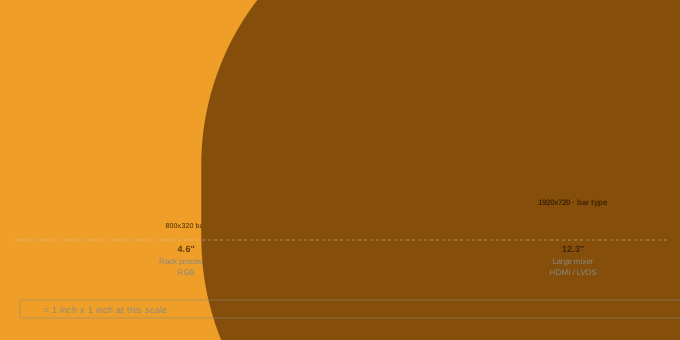
The bar LCD format is particularly common in rack-mount audio equipment. A 1U rack unit is 44.45mm tall. A standard 16:9 display at any size larger than about 3 inches will not fit within that height. Bar LCDs, with aspect ratios of 4:1 and wider, fit naturally into rack-format front panels and can span the full width of the unit while staying within the height constraint.
For a detailed breakdown of bar LCD sizes and interfaces from 3.9 to 15 inch, see our stretched bar LCD sizing guide.
EOL and long product lifecycles
Audio equipment has longer product lifecycles than most consumer electronics. A professional mixing console or digital audio workstation interface may stay in production for eight to twelve years. Display component lifecycles are typically shorter. This creates a recurring problem: a product that is still selling well has its display module discontinued by the supplier.
The most common scenario is a glass substrate transition. The panel manufacturer moves production to a newer glass generation, and the module built on the old glass goes end-of-life. In some cases, the replacement glass produces a module with the same active area and interface, and the transition requires only an FPC retooling. In other cases, the outer dimensions change enough that the front panel cutout needs to be reworked.
For audio equipment manufacturers, the practical response is to confirm the expected production lifecycle of any display module before committing it to a new design, and to identify replacement candidates before the EOL notification arrives rather than after. Our guide on LCD display EOL replacement covers the full process.
Budget realities in the audio equipment segment
Audio equipment spans a wide range of price points. A boutique effects pedal manufacturer working in low volumes has very different cost constraints from a professional console manufacturer shipping thousands of units per year. Display module selection in the audio segment often comes down to this tension earlier than in industrial applications.
A few points that come up regularly:
Standard modules are almost always cheaper than custom. If a standard bar LCD in the right size exists, the BOM cost is lower and the lead time is shorter. Custom work, including cover glass tooling, FPC modifications, or non-standard active areas, adds NRE cost that only makes sense above a certain volume threshold.
Sample cost and MOQ matter for smaller brands. A studio equipment company developing a new product may only need two or three samples to validate the design. Confirming sample availability and cost before choosing a supplier avoids the situation where a low-volume project ends up paying for a minimum sample batch it does not need.
Target price conversations should happen at the start, not after sampling. If the budget for the display module is fixed, that number should be shared with the supplier before samples are ordered. A module that passes technical validation but misses the cost target by 30
Touch in audio equipment: less common than you might expect
Most professional audio equipment uses physical controls: rotary encoders, faders, buttons. Touchscreens are less common than in consumer electronics, partly because professional users prefer the tactile feedback of physical controls and partly because audio equipment is often operated without looking directly at the panel.
When touch is used, it is typically on larger displays showing menus, patch lists, or signal routing views. Capacitive touch is the default for these applications. Resistive touch is rarely specified in audio equipment unless the device needs to work with a stylus or in environments where the operator’s hands may be wet or wearing gloves.
For applications where touch is part of the design, our guide on capacitive vs resistive touch panels covers the key decision points.
What to confirm before locking a display spec for an audio product
- What does the host board output natively, and is an adapter board required?
- What is the front panel cutout dimension, and does a standard module fit or is a custom active area needed?
- Is the panel IPS or TN, and does the firmware include the correct initialization sequence?
- What is the expected product lifecycle, and what is the confirmed production lifecycle of the display module?
- What is the target unit cost for the display at the expected annual volume?
- Is touch required, and if so, under what operating conditions?
Working on an audio equipment display specification? Share the front panel dimensions, host interface, and target volume and we can recommend a module based on what we have shipped for similar projects.
•

 English
  Español
  日本語
日本語  한국어
한국어
Leave a Reply