If you have ever been on the receiving end of an LCD module supplier’s Incoming Inspection Standard document, you know the feeling. Pages of tables, abbreviations like AQL and Ac/Re, defect classifications, filter specifications. The numbers are all there on the page, but the logic behind them is not always obvious. Why is “AQL=1.0” written next to Major defects but “AQL=2.5” next to Minor ones? Why does a clause that says “2 adjacent bright dots = reject (0)” read stricter than a single-dot limit? And whose job is it to decide whether a tiny speck near the edge of the screen counts as a defect at all?
This article walks through the LCD module incoming inspection standard the way a quality engineer or procurement manager would read it: not just what the numbers say, but what they actually mean when a shipment arrives at your dock.
What Is an Incoming Inspection Standard and Why It Is Not Just Paperwork
Incoming Quality Control (IQC) sits at the first gate of your supply chain. Before components reach your production line, someone has to decide: does this batch of TFT LCD modules meet the agreed specification, or does it go back?
The Incoming Inspection Standard (often abbreviated as IIS in supplier documentation) is the written agreement that answers that question. An LCD module incoming inspection standard typically covers five core sections:
- Purpose and scope, which modules this standard applies to
- Inspection conditions: lighting, viewing distance, viewing angle, and ambient environment
- Sampling plan: the statistical framework borrowed from MIL-STD-105E
- Defect classification: what counts as Major, Minor, or acceptable
- Inspection criteria by category: display dot defects, cosmetic appearance, touch panel function, mechanical dimensions
What the document really is, is a shared definition of “acceptable quality” between buyer and seller. Without a written LCD module incoming inspection standard, every shipment is a negotiation with no reference point. With it, both sides know the rules before the first box is opened.
What AQL Numbers Actually Mean (Not What You Might Think)
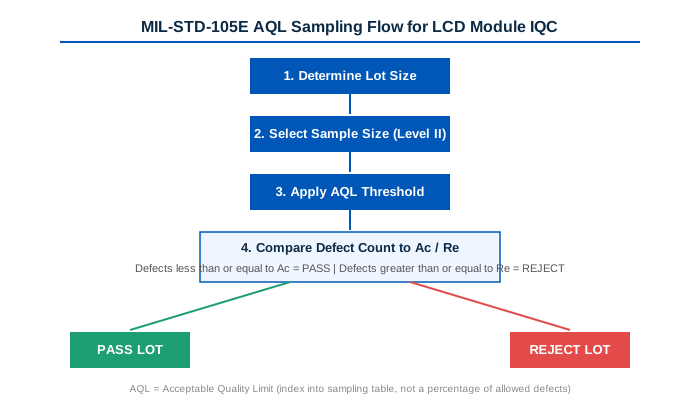
Most IIS documents for LCD modules cite two AQL thresholds. In a typical LCD module incoming inspection standard, Major defects are set at AQL=1.0 and Minor defects at AQL=2.5, with the sampling plan based on MIL-STD-105E, normal inspection level, usually Level II.
The common misunderstanding when reading an LCD module incoming inspection standard is that AQL=1.0 means “the supplier is allowed to ship 1 percent defective product.” That is not how it works. AQL stands for Acceptable Quality Limit, and the number is an index that feeds into a sampling table, not a permission slip.
Here is how it actually plays out. According to MIL-STD-105E, if your batch size is, say, 500 pieces, the Level II sampling plan directs you to pull 50 samples at random. For Major defects at AQL=1.0, the acceptance number (Ac) is 1 and the rejection number (Re) is 2. This means:
- If the inspector finds 0 or 1 Major defect among those 50 samples, the lot passes.
- If the inspector finds 2 or more Major defects, the entire lot is rejected.
For Minor defects at AQL=2.5, the same 50-sample pull uses Ac=3, Re=4. Up to 3 Minor defects pass, 4 or more trigger rejection.
| Lot Size | Sample Size (Level II) | Major (AQL 1.0) Ac/Re | Minor (AQL 2.5) Ac/Re |
|---|---|---|---|
| 91 to 150 | 20 | 0 / 1 | 1 / 2 |
| 151 to 280 | 32 | 1 / 2 | 2 / 3 |
| 281 to 500 | 50 | 1 / 2 | 3 / 4 |
| 501 to 1,200 | 80 | 2 / 3 | 5 / 6 |
| 1,201 to 3,200 | 125 | 3 / 4 | 7 / 8 |
The takeaway: A higher AQL number means the sampling plan tolerates more defects before triggering rejection, but at no point does it say “X percent of the shipment is allowed to be bad.” It is a statistical gate, not a quota.
Bright Dot and Dark Dot Criteria: The Section Engineers Actually Care About
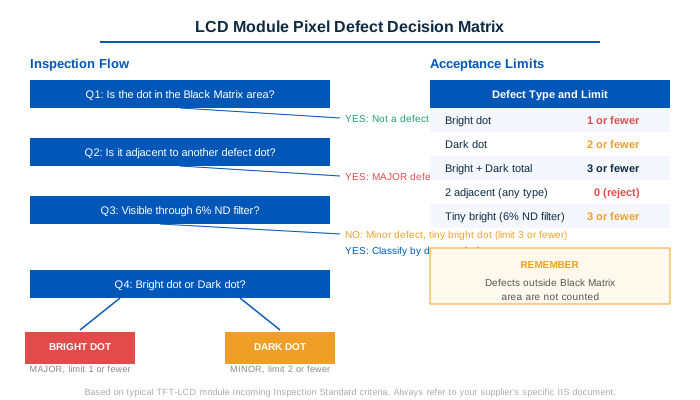
Display pixel defects are the most scrutinized part of any LCD module incoming inspection standard. A typical IIS breaks them down into bright dots (pixels stuck on), dark dots (pixels stuck off), and total combined count. Here is a representative standard drawn from real TFT LCD module IIS documents:
| Defect Type | Acceptance Limit | Classification |
|---|---|---|
| Bright dot (continuously lit) | ≤ 1 | Major |
| Dark dot (non-lit) | ≤ 2 | Minor |
| Bright + Dark total | ≤ 3 | Combined |
| 2 adjacent dots (any type) | 0 (immediate reject) | Major |
| Tiny bright dot (visible only with 6 percent ND filter) | ≤ 3 | Minor |
The adjacent-dot rule often confuses people on first reading. The individual limits are Bright ≤1 and Dark ≤2, which means up to three dots total can pass if they are the right type and are not next to each other. But two dots of any type sitting side by side trigger immediate rejection. Why is this stricter?
The reason is perceptual. A single isolated dot is hard to notice at normal viewing distance. Two adjacent dots form a visible cluster that the human eye picks up as a single larger defect, and that is exactly what end users complain about. From the supplier’s perspective, adjacent dot failures are rare but when they occur, the visual impact is disproportionate.
The 6 Percent ND Filter and Tiny Bright Dots
Another clause that raises questions is the tiny bright dot inspection using a 6 percent Neutral Density (ND) filter. The logic: some sub-pixel level bright spots are so faint that they are invisible under normal ambient light. The 6 percent ND filter cuts transmitted light to 6 percent of its original intensity, which makes very faint bright dots disappear while genuine bright dots remain visible. If a dot vanishes behind the filter, it is classified as a tiny bright dot and falls under Minor defect limits (typically ≤3). If it remains visible, it counts as a full bright dot toward the Major defect limit.
This matters in practice because it prevents borderline cases from being escalated. Without this filter-based distinction, every faint speck becomes a judgment call, and judgment calls are where inspection disputes start.
Touch Panel Functional Test Standards
For LCD modules with integrated touch panels, the LCD module incoming inspection standard includes a separate functional test section. The criteria are straightforward and unforgiving:
- Line break or no response across any segment of the touch area: Major defect, reject.
- Touch coordinate offset or lag exceeding the datasheet specification: Major defect.
- Intermittent response: Same classification as no response, since intermittent failures in the field are arguably worse than complete failures (they are harder to diagnose).
But there is a genuinely useful clause buried in most IIS touch test sections that rarely gets attention: if the test result conflicts with the customer’s mainboard requirements, the first step is not to reject the lot. It is to cross-check using the touch IC manufacturer’s own test tool, then discuss between both parties.
This is important because touch performance depends on the host system’s touch controller firmware, driver configuration, and even the mechanical stack-up of the final product. A touch panel that fails on one mainboard may work perfectly on another. The IIS acknowledges this by building in a verification step before rejection. It is a reminder that an LCD module incoming inspection standard is not a rigid pass/fail checklist. It is a framework that expects real-world engineering judgment.
Visual Inspection: The Details That Are Easy to Miss but Hard to Ignore
Beyond pixel defects and touch function, the visual and mechanical inspection section of any LCD module incoming inspection standard covers items that do not show up in an electrical test but absolutely affect whether the module can be used in production:
| Inspection Item | What to Check | Why It Matters |
|---|---|---|
| FPC / flexible printed circuit | Scratches exposing copper, tears, kinks at the bend radius | A scratched FPC trace may pass continuity today and fail after thermal cycling |
| Metal frame / bezel | Oxidation, corrosion spots, deformation, burrs | Oxidation suggests storage issues that may also affect the LCD cell |
| Backlight unit (BLU) | Scratches on the light guide surface, foreign particles between films | Scratches on the BLU create visible bright lines when the backlight is on |
| Connector | Bent pins, incomplete insertion, locking tab damage | A deformed connector may mate but lose contact under vibration |
| Cover glass / touch surface | Chips on edges, scratches in the active area, ink peeling on the border | Edge chips are stress concentrators that grow into cracks during assembly |
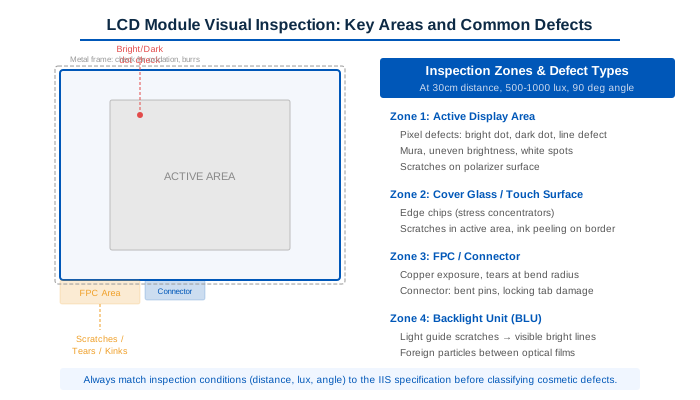
One detail that experienced QC engineers pay attention to when following an LCD module incoming inspection standard: the inspection distance and lighting angle specified in the IIS matter enormously for cosmetic items. A typical spec says inspection at 30cm distance under 500 to 1000 lux with the viewing angle at 90 degrees to the surface. A scratch that is invisible under these conditions but visible at 10cm under a spotlight is not a reject. If your inspector is using a different setup than what the IIS specifies, your rejection rate on cosmetic items will drift.
What Happens When You Find a Problem: Dispute Resolution
Every IIS worth its paper includes a section on dispute handling, and the wording is worth reading carefully. A common formulation is something like: “In case of dispute, both parties shall discuss and determine the final judgment based on the principle of friendly cooperation.”
That sounds like boilerplate, but it carries real contractual weight. It means the IIS is not a unilateral standard imposed by the supplier. It is a mutually referenced document, and the “discuss and determine” clause gives the buyer leverage: if a defect falls into a gray area, you are entitled to a conversation, not a form-letter rejection of your claim.
In practice, here is what makes a dispute go smoothly when you are on the buyer side:
- Photograph the defect clearly, with the module serial number and batch label in the same frame
- Reference the specific clause number in the IIS, not just “it looks bad”
- Note the inspection conditions (light level, distance, angle) to confirm they match the IIS specification
- If the defect is borderline, include comparison photos of a conforming unit under the same conditions
- Propose a disposition: sort and return, whole-lot rejection, or acceptance with concession
Suppliers who take quality seriously treat a well-documented defect report as useful feedback, not as an attack. The team I work with at CDTECH uses the same LCD module incoming inspection standard during pre-shipment inspection, so the unit that arrives at your dock has already been checked against the same criteria. That does not eliminate the need for your own IQC against the same LCD module incoming inspection standard, but it reduces the probability of a nasty surprise when the boxes are opened.
Working on a project that needs a specific display configuration and want to understand what inspection criteria apply? I am happy to share a reference IIS document and discuss how the defect criteria map to your application requirements. Contact: [email protected]
Frequently Asked Questions
What is the difference between AQL 1.0 and AQL 2.5 in an LCD module inspection standard?
AQL 1.0 is a tighter limit used for Major defects (defects that affect function or safety). For a sample size of 50 pieces under MIL-STD-105E Level II, AQL 1.0 gives an acceptance number of 1 and rejection number of 2, meaning 2 or more defects trigger lot rejection. AQL 2.5 is looser and used for Minor defects (cosmetic issues that do not affect function), with acceptance at 3 and rejection at 4 for the same sample size. The number is an index into a sampling table, not a percentage of allowed defects.
Why does the adjacent dot rule seem stricter than individual dot limits?
Two adjacent bright or dark dots form a visible cluster that the human eye perceives as a single larger defect, which is far more noticeable than two isolated dots at different locations. Most IIS documents set the adjacent dot limit to zero (immediate rejection) because the visual impact is disproportionate. This is a perceptual standard, not an arbitrary number.
What is a 6 percent ND filter and why is it used for tiny bright dot inspection?
A 6 percent Neutral Density (ND) filter cuts transmitted light to 6 percent of its original intensity, making very faint sub-pixel bright spots disappear while genuine bright dots remain visible. If a dot vanishes behind the filter, it is classified as a tiny bright dot under Minor defect limits. If it stays visible, it counts as a full bright dot under Major defect limits. The filter provides an objective way to separate borderline cases.
Who pays for rejected lots under IIS terms?
This depends on the supply contract, not the IIS alone. The IIS defines what counts as a defect, but the commercial terms (who pays return shipping, who covers rework cost, whether a replacement order is issued or a refund is made) are specified in the purchase agreement. Most suppliers cover return shipping and replacement for confirmed Major defects found during incoming inspection. For Minor defects near the AQL limit, the resolution is often negotiated case by case.

 English
  Español
  日本語
日本語  한국어
한국어
Leave a Reply