If you search for “7 inch TFT display,” you will land on product page after product page. Each one lists a resolution, an interface type, maybe a brightness number. But none of them answer the question that actually matters: which one is right for your specific project?
I have worked with enough engineers and procurement teams to know that the wrong pick costs you more than time. It costs you a redesign cycle, a batch of unusable inventory, or a product that fails validation because the display dims at 70 degrees Celsius or flickers near a motor drive.
This article is not another product catalog. It is an application-driven selection framework. By the end, you will know which resolution, interface, brightness, and touch type match your use case, and which ones do not.
Start with Your Application, Not the Spec Sheet
The most common mistake I see is comparing specifications first and thinking about the application later. That is backwards. A 1024×600 MIPI display with 1000 nits is objectively impressive, but if your MCU only outputs RGB and your device lives in a dim server room, it is the wrong part.
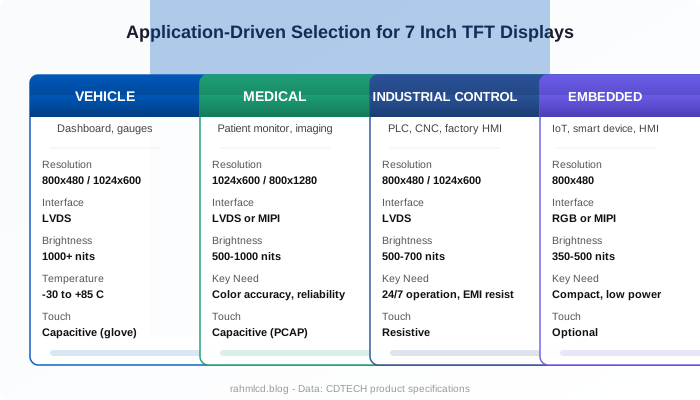
Here is how four common industrial application categories break down, and what each one demands from a 7 inch TFT display.
| Application | Key Requirement | Recommended Resolution | Recommended Interface | Brightness | Touch |
|---|---|---|---|---|---|
| Vehicle dashboard | Wide temp, vibration resistance, sunlight readable | 800×480 or 1024×600 | LVDS | 1000+ nits | Capacitive (glove-compatible) |
| Medical device | Color accuracy, long lifecycle, reliability certification | 1024×600 or 800×1280 | LVDS or MIPI | 500-1000 nits | Capacitive |
| Industrial control panel | 24/7 operation, EMI resistance, touch durability | 800×480 or 1024×600 | LVDS | 500-700 nits | Resistive |
| Embedded HMI | Compact design, low power, MCU compatibility | 800×480 | RGB or MIPI | 350-500 nits | Optional |
Notice the pattern: the same 7 inch TFT display form factor needs entirely different specs depending on where it goes. A display that works perfectly in an indoor HMI will wash out completely in a tractor dashboard. Start from your application, and the specs fall into place.
Resolution at 7 Inches: 800×480 vs 1024×600 vs Higher
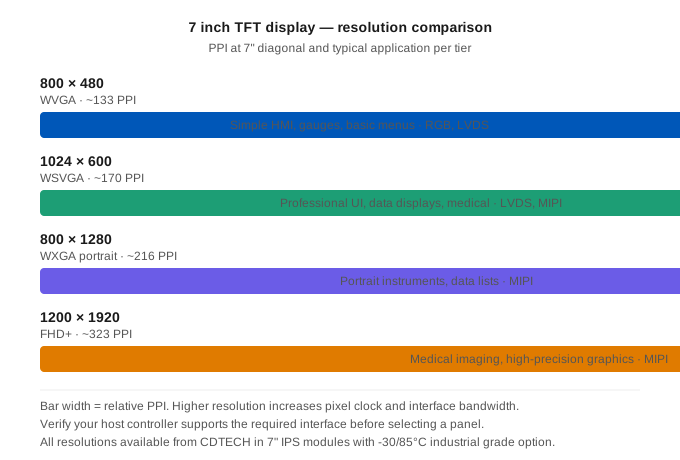
At the 7 inch diagonal, three resolution tiers dominate: 800×480, 1024×600, and higher options going up to 1200×1920. Each has a real cost in terms of interface bandwidth, MCU processing power, and power consumption. Higher is not always better.
800×480 (WVGA): The Workhorse
If your UI consists of text values, simple icons, bar graphs, or basic menus, 800×480 is enough. At 7 inches, this gives you roughly 133 pixels per inch (PPI), which is comparable to an older desktop monitor held at arm’s length. It is also the most forgiving resolution for RGB interfaces and lower-cost MCUs. Many industrial control panels and vehicle gauge clusters run on 800×480 panels and will continue to do so.
1024×600 (WSVGA): The Sweet Spot
At roughly 170 PPI on a 7 inch panel, 1024×600 offers noticeably sharper text and enough pixel budget for layered UI elements without crowding. If your interface includes icons with labels, multi-line data tables, or graphical elements like waveform displays, 1024×600 is the resolution to target. It requires more interface bandwidth, but the jump in visual quality is worth it for most professional applications.
800×1280 and 1200×1920: When Pixel Density Matters
For portrait-oriented instrument panels, 800×1280 gives you vertical information density that a 1024×600 landscape panel cannot match. At the top end, 1200×1920 on a 7 inch screen delivers over 320 PPI, approaching smartphone sharpness. This matters for medical imaging, high-detail mapping, or any application where users need to read small text for extended periods. The trade-off is that these resolutions require MIPI DSI and a capable graphics pipeline.
| Resolution | PPI (at 7″) | Best For | Typical Interface |
|---|---|---|---|
| 800×480 | ~133 | Simple HMIs, gauges, basic menus | RGB, LVDS |
| 1024×600 | ~170 | Professional UIs, data displays, medical | LVDS, MIPI |
| 800×1280 | ~216 | Portrait instruments, data lists | MIPI |
| 1200×1920 | ~323 | Medical imaging, high-precision graphics | MIPI |
RGB, LVDS, or MIPI? A Practical Interface Decision Tree
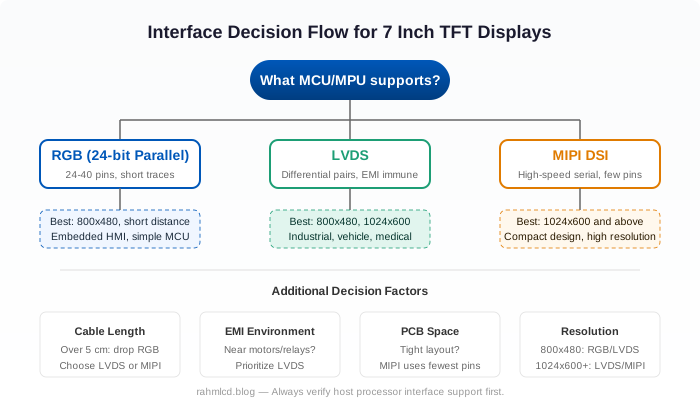
If there is one question I get asked more than any other, it is this: which interface should I use for my 7 inch TFT display? The answer is straightforward once you know what to look at. Here is the one-sentence version of each option.
RGB (typically 24-bit parallel): Simple, direct, no protocol overhead. But it uses 24 to 40 pins and works best over short trace lengths, under a few centimeters. If your board is small and your resolution is 800×480 or below, RGB is often the simplest route.
LVDS (Low-Voltage Differential Signaling): Uses differential pairs to send data, which makes it highly resistant to electromagnetic interference. This is the standard choice for industrial environments where cables run past motors, relays, or power supplies. LVDS handles resolutions up to 1024×600 comfortably and can go higher with dual-link configurations.
MIPI DSI (Display Serial Interface): A high-speed serial protocol that uses far fewer pins than RGB, typically 4 to 8 data lanes. MIPI is the go-to for high-resolution panels (1024×600 and above) and for compact embedded designs where PCB space is at a premium. Most modern application processors from NXP, TI, Rockchip, and MediaTek include MIPI DSI outputs.
Here is the decision flow I use when helping customers narrow this down:
- What interface does your host processor support? Eliminate incompatible options first.
- What is your target resolution? 800×480 works with RGB or LVDS. 1024×600 and above favors LVDS or MIPI.
- How long is the connection between your board and the display? Over 5 cm, drop RGB in favor of LVDS.
- Is your device near motors, relays, or high-current switching? Prioritize LVDS for its noise immunity.
- Is PCB space tight? MIPI uses the fewest pins.
How Bright Should a 7 Inch Display Be? Nits in Practice
Brightness specifications are easy to read and easy to misunderstand. A higher number is always brighter, but it also means higher power draw, more heat, and a higher price. The right brightness is the minimum that keeps your display readable in its intended environment.
Here is a practical breakdown based on where the display will be used:
- Indoor, controlled lighting (server room, lab equipment): 300 to 500 nits is sufficient. These environments are dim and stable. Going higher adds cost with no user-facing benefit.
- Indoor, near windows (hospital ward, office kiosk): 700 to 1000 nits. Indirect daylight can wash out a 350-nit panel surprisingly fast.
- Semi-outdoor, shaded (vehicle cabin, fuel dispenser, agricultural equipment): 1000 nits. Direct sun may hit the display at certain angles or times of day.
- Full outdoor, direct sunlight (marine navigation, outdoor kiosk, construction equipment): 1500 to 2500 nits. At this level, every additional 500 nits makes a visible difference.
Here is something that often gets overlooked: optical bonding, where the touch panel or cover glass is laminated directly to the LCD with no air gap, cuts surface reflections from roughly 8-10
For a deeper dive into brightness and sunlight readability, read this article on what the nits number actually means outdoors.
Touch Panel: Do You Need One, and Which Type?
Before choosing between resistive and capacitive, ask a simpler question: does this device need a touchscreen at all? In some industrial settings, physical buttons and knobs are more reliable and easier to operate with gloved hands. Adding a touch panel adds cost, reduces optical clarity slightly, and introduces a component that can wear or fail. Make sure touch is actually serving the user before adding it.
If touch is needed, here is the practical distinction:
Resistive touch works by pressure. A finger, a gloved hand, a stylus, anything that presses the top layer makes contact. This makes resistive panels ideal for factory floors, clean rooms, and any environment where operators wear gloves or where water and dust are common. They cost less than capacitive panels. The trade-offs: slightly lower optical clarity, no multi-touch gestures, and the top film can degrade over years of heavy use.
Capacitive touch (PCAP) detects the electrical properties of a bare finger. It supports multi-touch gestures like pinch-to-zoom and swipe, delivers higher optical clarity, and provides a smoother user experience. Modern PCAP controllers can be tuned for gloved operation, rain rejection, and thick cover glass, which has made capacitive panels increasingly common in industrial and medical devices. The trade-off: higher cost per unit and more complex integration.
| Factor | Resistive | Capacitive (PCAP) |
|---|---|---|
| Input method | Any pressure (finger, glove, stylus) | Bare finger (or tuned for thin gloves) |
| Multi-touch | No | Yes (up to 10 points) |
| Optical clarity | Good (~80 | Excellent (~90 |
| Durability | Film can scratch over time | Glass surface, very durable |
| Cost | Lower | Higher |
| Best environment | Factory, outdoor, gloved use | Medical, HMI, consumer-facing |
For a more detailed comparison, see the full guide on capacitive vs resistive touch for industrial and medical applications.
Before You Order: What OEM Buyers Should Check
Choosing the right specs is half the battle. Sourcing the display reliably is the other half. Here are the questions I recommend every buyer ask before committing to a 7 inch TFT display supplier.
What is the MOQ? For standard off-the-shelf models, MOQs are typically flexible, sometimes as low as a few dozen units for sampling, scaling up for production volumes. Custom modules, where the FPC, cover glass, or backlight is modified, usually have a minimum order that depends on the scope of the customization.
What are the lead times? Standard samples typically ship in 2 to 4 weeks. Production batches range from 4 to 8 weeks depending on volume and complexity. Ask about both numbers before you commit, not after.
What can be customized? Common customization options for 7 inch TFT displays include FPC length and shape, interface pinout, cover glass (with AG, AR, or AF coatings), backlight brightness tuning, and touch panel integration. Clarify what your supplier can modify and what is fixed.
What is the EOL strategy? This is the question most first-time buyers skip, and it is the one that hurts the most when ignored. Consumer display panels have short lifecycles, sometimes 12 to 18 months. Industrial panels, like the ones CDTECH supplies, are designed for much longer availability. Ask your supplier how long the model will be in production, and whether a pin-compatible replacement path exists if the panel is eventually discontinued. Read more about managing LCD EOL here.
What certifications are included? RoHS compliance is the baseline. For medical devices, additional biocompatibility or IEC 60601 considerations may apply. For automotive, AEC-Q or similar qualification may be required. Be upfront about certification needs during the sourcing stage.
Working on a project that needs a specific 7 inch TFT display configuration? Feel free to reach out. I am happy to help figure out what works best for your application. Contact: [email protected]
Frequently Asked Questions
Can I use a consumer-grade 7 inch TFT display in an industrial product?
The short answer is no. Consumer displays are designed for room temperature and limited operating hours. Industrial environments demand wider temperature ranges (at least -20 to 70 degrees Celsius, often -30 to 85), higher reliability, and longer product availability. A $30 consumer panel that fails at 60 degrees Celsius or goes EOL in 18 months ends up costing far more than an industrial-grade panel bought once.
How do I decide between LVDS and MIPI for a 7 inch display?
Start with your host processor. If it only has LVDS, the decision is made. If it only has MIPI, same story. If it has both, lean LVDS for electrically noisy environments or longer cable runs, and MIPI for compact designs or resolutions above 1024×600. There is no universal better between the two, only what fits your system.
Is 800×480 enough for a 7 inch display, or should I go with 1024×600?
It depends on your UI. If your interface shows a few numeric readouts, status icons, and simple menus, 800×480 is enough and keeps your BOM cost lower. If you need layered UI elements, data tables, or graphical content like trend charts, 1024×600 is the better investment. The PPI difference, roughly 133 vs 170, is noticeable when reading text.
What makes a 7 inch TFT display industrial grade?
Three things: wide operating temperature range (at least -20 to 70 degrees Celsius, ideally -30 to 85), long product availability (5 years or more vs the 12-18 month consumer cycle), and component selection rated for 24/7 operation rather than intermittent use. Some industrial displays also include optical bonding for vibration resistance and improved sunlight readability.
How long can I expect a 7 inch TFT display model to stay in production?
Industrial panels typically stay in production for 5 years or more. Consumer panels, by contrast, can vanish in 12 to 18 months as phone and tablet designs change. If you are designing a product with a multi-year lifecycle, confirm availability timelines with your supplier and ask about pin-compatible drop-in paths. This matters more than most people realize until they face a redesign because a panel disappeared.

 English
  Español
  日本語
日本語  한국어
한국어
Leave a Reply