
This guide compares IPS and TN LCD panels across key specs, real bring-up behavior, and industrial application fit — so engineers and procurement teams can make the right call before ordering.
When powering up an IPS LCD display, have you ever seen the backlight glow from the side, but the screen itself stays black? One of our clients recently ran into this, and at first, it looked like a wiring or signal problem. But the real reason came down to something more basic: the difference between IPS vs TN panel types.
“I think I’ve got everything connected properly and am getting approx. 19.5V forward voltage to the display’s backlight VBL+ pins.”
“I can see LED light shining from the side where the BL flex cable enters.”
“But I don’t see any LED light illuminating the display surface.”
When I first read this message from one of our clients, my instinct was to suspect timing or signal issues, one of the most common causes of a black screen during LCD bring-up.
But after going through his description more carefully, it became clear the answer was much simpler.
This was not a fault in wiring, firmware, or voltage levels. This was about something more fundamental, something that many developers still get tripped up on: the type of LCD panel being used.
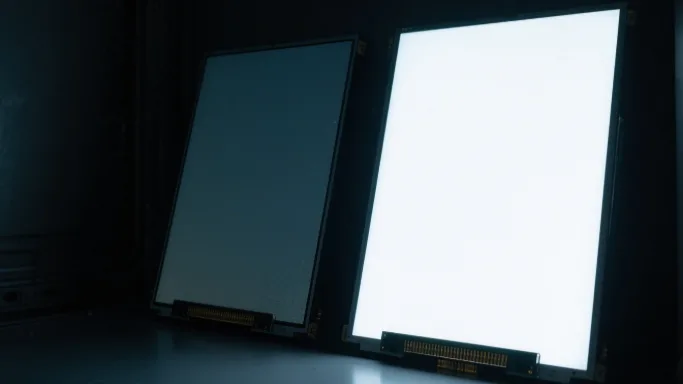
1. IPS vs TN: What Happens When There Is No Signal Input
Without signal input, IPS screens remain black. Some TN panels may look white when the backlight is on, but this depends on the specific configuration.
| Panel Type | Default State (No Signal) | Appearance with Backlight Only |
|---|---|---|
| IPS | Light-blocking | Black (no visible light) |
| TN | Light-transmissive | White (bright background) |
In this case, the developer was using an IPS panel, which behaves very differently from TN. When no signal is applied, the liquid crystals in IPS panels block light. Even if the backlight is on and functioning, the display surface stays black until image data is sent.
2. A Closer Look at the Customer Setup
“There’s no digital data interface being driven, since these boards do not yet have an OS loaded.”
“The datasheet says pulling LCD_RESET low enables the display — but I’m not sure if that affects backlight operation.”
The customer had correctly connected the backlight circuit, confirmed 19.5V at VBL+, and observed side light and brightness adjustment working. However, the screen appeared black from the front.
This is completely normal for IPS:
- No image data = no pixel switching
- No switching = liquid crystals block light
- Result: black screen
Once image data is sent, the internal driver will orient the crystals to allow light through, and the image becomes visible.
3. TN Panels Show Light by Default
If the customer had been using a TN panel, they would have seen a white screen immediately after the backlight powered on. That is because TN liquid crystals allow light to pass in their default (no-voltage) state.
This behavior is often misinterpreted: many engineers new to IPS expect the screen to “light up” the same way as TN, but that is not how IPS works.
4. IPS vs TN: Full Specification Comparison
Understanding the bring-up behavior is just the start. When specifying a display module for a real project, the decision between IPS and TN comes down to several factors: viewing angle, color accuracy, temperature range, response time, and cost.
| Specification | IPS | TN |
|---|---|---|
| Viewing Angle (H/V) | Up to 178° / 178° | Typically 160° / 140° or narrower |
| Color Reproduction | Accurate, stable at all angles | Color shift at off-axis viewing |
| Contrast Ratio | 800:1 to 1200:1 (typical) | 500:1 to 800:1 (typical) |
| Response Time | 10ms to 25ms (typical) | 2ms to 8ms (faster switching) |
| Operating Temperature | -20°C to +70°C (wide temp grade) | -20°C to +70°C (similar range) |
| Idle State (No Signal) | Black (light-blocking) | White (light-transmissive) |
| Unit Cost (same size) | Higher | Lower |
| Brightness Uniformity | Better | Acceptable |
For most industrial and medical display projects, viewing angle and color accuracy are the deciding factors. TN panels remain relevant for cost-sensitive applications where the display is viewed straight-on and fast response matters more than color fidelity.
5. Which Panel Fits Which Application
Choosing between IPS and TN is not just a spec sheet exercise. The physical environment, user interaction pattern, and viewing conditions all influence which panel will actually perform better in the field.
Medical Equipment
IPS is strongly preferred. Diagnostic displays, patient monitors, and bedside terminals are viewed from multiple angles by clinicians standing or sitting in different positions. Color accuracy is also critical when displaying imaging data or waveforms. A TN panel showing color shift at 30 degrees off-axis is not acceptable in this environment.
Wide-temperature IPS modules with optically bonded covers are the standard configuration for medical device integrators sourcing from module manufacturers like CDTECH.
Automotive and Vehicle Displays
IPS is standard for in-cabin displays. Center console screens, instrument clusters, and rear-seat entertainment units all require wide viewing angles because multiple passengers view the screen from different positions. The color stability of IPS at high and low temperatures also matters in automotive environments where the cabin can reach 80°C in summer.
TN panels may still appear in cost-optimized commercial vehicle dashboards where the primary user (driver) looks straight at the display and unit cost is tightly controlled.
Industrial HMI and Control Panels
Either can work, depending on mounting position. A panel mounted at fixed eye level in a control room cabinet, viewed by one operator, can use TN without issue. A panel mounted on a rotating arm, or one that multiple operators glance at from different directions, needs IPS.
Industrial environments also raise the question of sunlight readability. IPS modules with high-brightness backlights (800 nits and above) perform better in mixed indoor/outdoor conditions than TN modules at the same brightness level, due to better contrast at angles.
Smart Home and Building Automation
IPS is preferred for wall-mounted panels. Touchscreen panels for lighting control, HVAC, and access control are typically installed at a fixed height but used by people of different heights. The wide viewing angle of IPS means the interface remains legible and color-accurate regardless of whether the user is looking slightly up or down at the panel.
Cost-Sensitive and High-Volume Applications
TN remains competitive here. For applications like handheld barcode scanners, basic industrial terminals viewed straight-on, or consumer devices where bill of materials is tightly managed, TN panels offer a meaningful cost advantage. If the viewing conditions are controlled and color accuracy is not a primary requirement, TN is a rational choice.
6. How to Identify Panel Type from a Datasheet
When evaluating a module datasheet, the panel type is not always labeled as “IPS” or “TN” in the product name. Here is what to check:
- Display Mode field: Look for “Normally Black” (IPS) or “Normally White” (most TN). This directly describes the idle state behavior covered in the case study above.
- Viewing angle spec: IPS panels will show symmetric angles, such as 80° left / 80° right / 80° up / 80° down. TN panels often show asymmetric specs, with the up or down angle noticeably narrower.
- LC type or driving mode: Some datasheets specify “a-Si TFT IPS” or “a-Si TFT TN” in the optical characteristics section.
- When in doubt, ask your module supplier directly. For custom or semi-custom modules, the manufacturer can confirm the cell type and provide sample panels for evaluation before committing to a production order.
7. Procurement Checklist: IPS vs TN Decision
For procurement teams finalizing a display module specification, here is a quick checklist to confirm the panel type decision before placing an order:
- Is the display viewed from multiple angles or by multiple users? If yes, specify IPS.
- Does the application involve medical imaging, color-critical UI, or outdoor-readable content? If yes, specify IPS.
- Is the display fixed-mount, single-user, straight-on only, with a tight BOM target? TN may be appropriate.
- Has your firmware team been briefed that IPS panels will show a black screen during bring-up before signal is sent? Confirm this early to avoid unnecessary debugging cycles.
- Has the operating temperature range been cross-checked against the panel spec? Both IPS and TN can be sourced in wide-temperature grades, but confirm with your supplier before assuming standard grade is sufficient.
Not a Fault — Just IPS Doing Its Job
So the next time you are powering up an IPS LCD and wondering why the screen stays dark even with the backlight glowing, remember: it is not a defect, it is just how IPS works.
And when it comes to choosing between IPS and TN for your next project, the decision is rarely about which panel is “better.” It is about which panel fits your application’s viewing conditions, temperature environment, color requirements, and budget. In most industrial, medical, and automotive applications today, IPS is the default choice. TN still has a place where cost is the primary driver and viewing conditions are controlled.
If you are at the specification stage and unsure which panel type fits your project, feel free to reach out. We work with both IPS and TN modules across 2.4 to 15.6 inch sizes and can help match the right panel to your application before the design is locked.

 English
  Español
  日本語
日本語  한국어
한국어
Leave a Reply