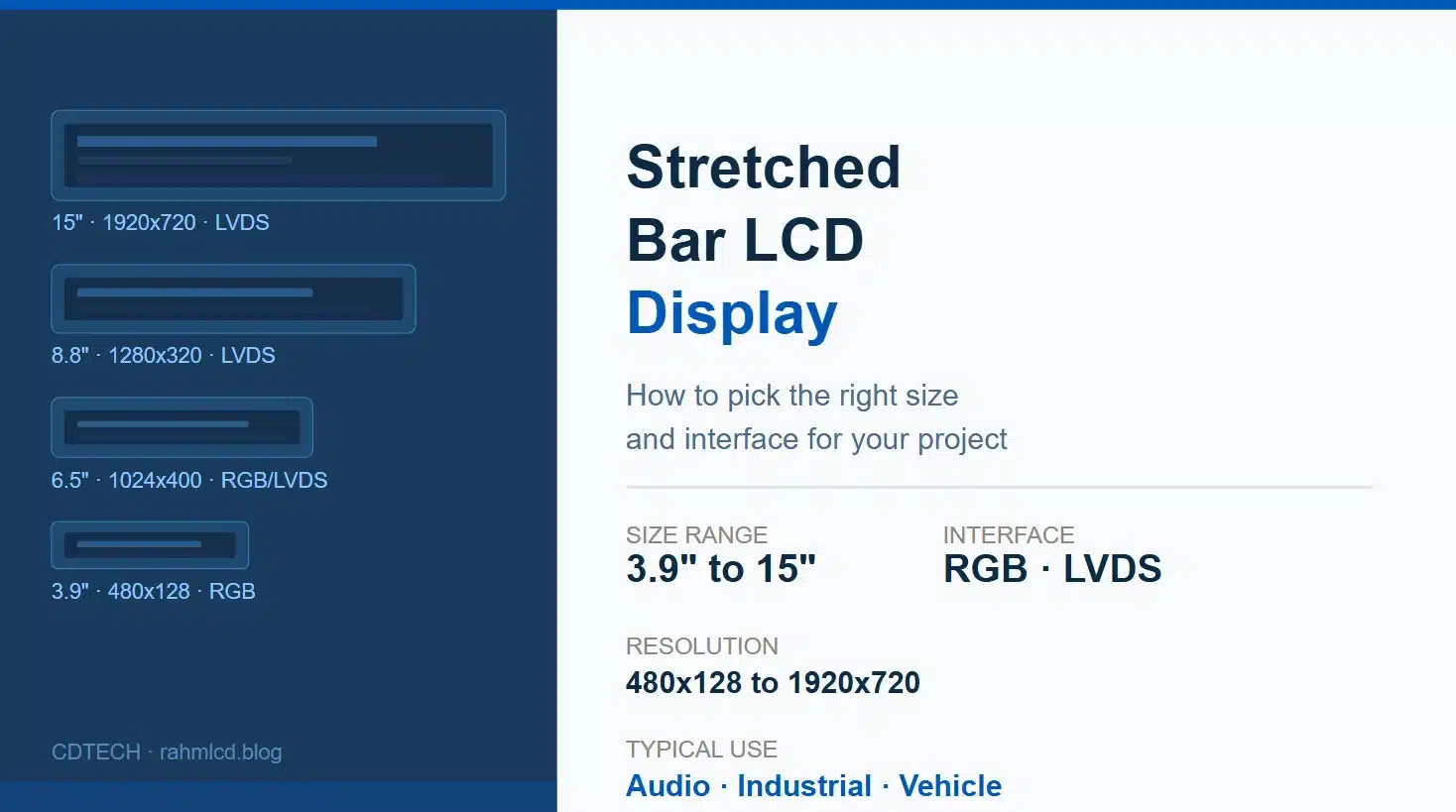
バーLCDディスプレイは、通常3:1から8:1のアスペクト比を持つストレッチフォーマットのTFTパネルで、オーディオ機器、産業用HMI、車両のダッシュボードなど、標準の長方形ディスプレイが収容できない場所で使用されます。
You have already decided on a bar LCD display. The form factor is settled, the enclosure is drawn, and the aspect ratio is locked. What is not settled is which one: 3.9 inch or 8.8 inch, RGB or LVDS, 480×128 or 1280×320. That is the decision that actually takes time, and it is the one this article is about.
プロセスの初期段階にあり、バーLCDディスプレイがプロジェクトに適しているかどうかをまだ評価している場合、 この概要は基本と典型的な使用例をカバーしています。インターフェースタイプ、タッチオプション、モジュールの構造についてのより広範な紹介については、私たちの 完全なTFT LCDモジュールガイドを参照してくださいこの記事は、バーLCDディスプレイの決定がなされた後から始まります。
画面が実際に表示する必要があるものから始めましょう
解像度は最初のフィルターであり、サイズから始めるよりも有用です。3行のステータステキストとプログレスバーを表示するバーLCDディスプレイは、アイコンとライブ波形データを持つスクロールメニューを実行するものとは完全に異なる要件があります。
The practical resolution bands for bar LCD displays break down like this. On the lower end, 320×120 and 480×128 are character and simple graphic territory. You can display text, basic icons, a few data fields. At 800×280, 800×320, and 1024×400 you are in the comfortable range for embedded UI with moderate detail: menus, status dashboards, audio controls. Jump to 1280×320 or 1920×720 and you are building something that genuinely needs pixel density, smooth rendering, and usually a more capable host processor to push it.
The mistake that comes up repeatedly is selecting resolution based on what looks impressive on paper rather than what the UI actually requires. A 1920×720 bar LCD display driven by an underpowered processor produces a worse result than an 800×320 panel driven well.
ラインナップを見ていきましょう
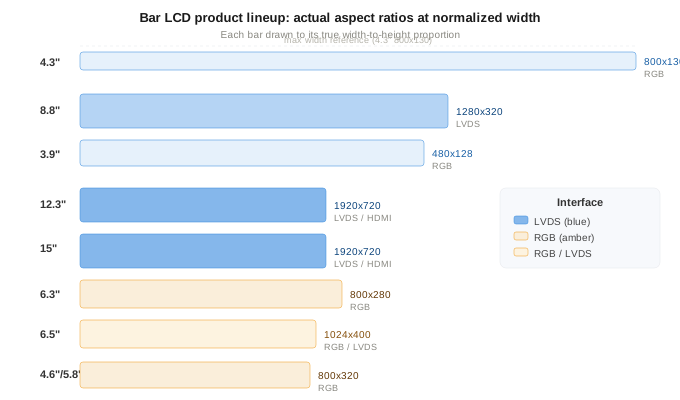
3.9インチ、480×128
This is the entry point for functional bar LCD displays. Small enough to fit into audio equipment front panels, handheld devices, or narrow control strips. RGB interface, which means direct connection to most microcontrollers without a bridge chip. If your project is cost-sensitive, relatively simple in UI requirements, and constrained by space, this bar LCD display is often the answer. The limitation is resolution: 480×128 is not the place for detailed graphics or small fonts.
4.3インチ、800×130および5.8または4.6インチ、800×320
The 800×130 is an unusual aspect ratio, very long and very thin. It suits applications where the bar LCD display strip is decorative as much as functional: audio level meters, thin status bars on appliances, indicator strips on industrial equipment. The 800×320 modules at 4.6 and 5.8 inch give you more vertical resolution to work with, which opens up proper menu navigation and multi-row data display. Both run on RGB, which keeps the integration straightforward.
6.3インチ、800×280および6.5インチ、1024×400
This is the range where a bar LCD display starts feeling like a real primary display rather than a supplementary strip. The 6.3 at 800×280 is RGB only, clean and simple. The 6.5 at 1024×400 gives you noticeably more pixel density and comes with both RGB and LVDS options, which makes it the first point in the lineup where the interface choice becomes a real decision rather than a default.
オーディオ機器の場合、6.5インチのバーLCDディスプレイはしばしば最適なサイズです:波形、EQカーブ、またはトラック情報を明確に表示するのに十分大きく、標準のラックマウントまたはデスクトップユニットのフロントパネルに収まるのに十分小さいです。このサイズの産業用途では、ケーブルの長さが約30センチメートルを超える場合や、環境に電気的ノイズがある場合、6.5インチのLVDSオプションを検討する価値があります。
8.8インチ、1280×320
This is the most requested bar LCD display size in the industrial segment. At 1280×320, you have enough horizontal resolution to display multiple data channels side by side, run a proper touchscreen interface, or show a wide process overview without scrolling. The interface is LVDS, which is not negotiable at this size and resolution combination: RGB at 1280×320 would require a wide parallel bus that becomes impractical on most embedded designs. LVDS keeps the cable count down and handles the bandwidth cleanly.
8.8インチのバーLCDディスプレイについて知っておくべきことの一つは、物理的な長さが重要であるということです。幅約217mm、高さ55mmで、取り付け要件は標準の長方形ディスプレイとは異なります。エンクロージャのカットアウトは非常に特異であるため、通常はディスプレイに合わせて最初から設計する必要があり、後付けすることはできません。
12.3インチおよび15インチ、1920×720
These are the large-format end of the bar LCD display range. At 1920×720, the pixel density is high enough for detailed UI, video content, or wide multi-zone layouts. LVDS is the primary interface here, with HDMI available on some variants for applications that need a plug-and-play connection to a host computer rather than an embedded driver board.
産業用機械インターフェース、車両ダッシュボード、広幅情報ディスプレイは、このサイズの大きなバーLCDディスプレイの典型的な用途です。特に15インチのバリエーションは、物理的なスケールのためにオーディオ機器ではあまり一般的ではありません。デスクトップオーディオユニットの15インチバーパネルは、前面全体を支配してしまいます。
RGB対LVDS:短いバージョン
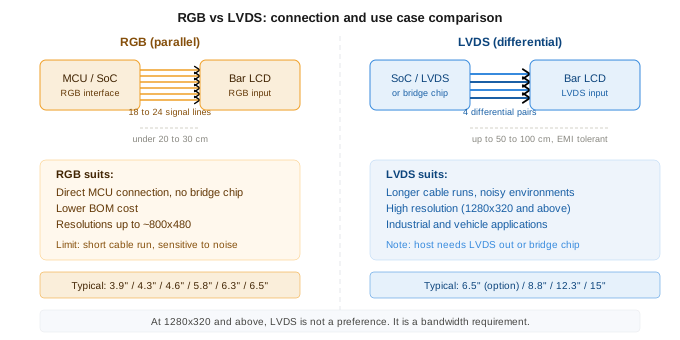
RGB is simpler. It connects directly to most microcontrollers and SoCs that have a parallel display interface. No bridge chip, no additional components, lower BOM cost. It works well for shorter cable runs on a bar LCD display, typically under 20 to 30 centimeters, and for resolutions up to about 800×480 in practical terms.
LVDS is more robust. It uses differential signaling, which means it handles longer cable runs and electrically noisy environments much better than parallel RGB. For any bar LCD display at 1280×320 and above, or for any installation where the display is more than 30 centimeters from the host board, LVDS is the more reliable choice. The cost is a slightly more involved integration: you need a host that outputs LVDS, or a bridge chip between your processor and the display.
仕様を最終決定する前に答える価値のある質問
- UIは実際に何を表示する必要がありますか?インターフェースの最も密な画面を通過し、要素を数えます。これにより、バーLCDディスプレイに必要な最小解像度がわかりますが、最大の解像度ではありません。
- 最終組み立てにおいて、ディスプレイはホストボードからどれくらい離れていますか?20cm未満の場合、RGBで問題ありません。30cmを超える場合や騒がしい環境では、LVDSを選択してください。
- プロセッサまたはSoCにはネイティブLVDS出力がありますか、それともブリッジチップが必要ですか?これにより、BOMとレイアウトが大きく変わります。
- タッチは必要ですか?すべてのバーLCDディスプレイモジュールにタッチパネルオプションが付いているわけではありません。検討している特定のサイズとインターフェースの組み合わせの可用性を確認してください。
- 取り付けの制約は何ですか?バーLCDディスプレイは、ブラケット設計、ベゼルクリアランス、FPCルーティングに影響を与える異常なアスペクト比を持っています。特にFPCの出口方向は早めに確認する価値があります。なぜなら、工具後に変更するのは高額になるからです。FPCカスタマイズのリードタイムについては、私たちのガイドを参照してください。 カスタムLCDモジュール開発.
特定のバーLCDディスプレイのサイズと用途を考えていて、正しいインターフェースと解像度の組み合わせを確認したい場合は、詳細を共有してください。類似のプロジェクトで出荷した内容に基づいて直接的な回答をお伝えできます。 こちらからお問い合わせください。

 日本語
日本語  English
  Español
  한국어
한국어
コメントを残す