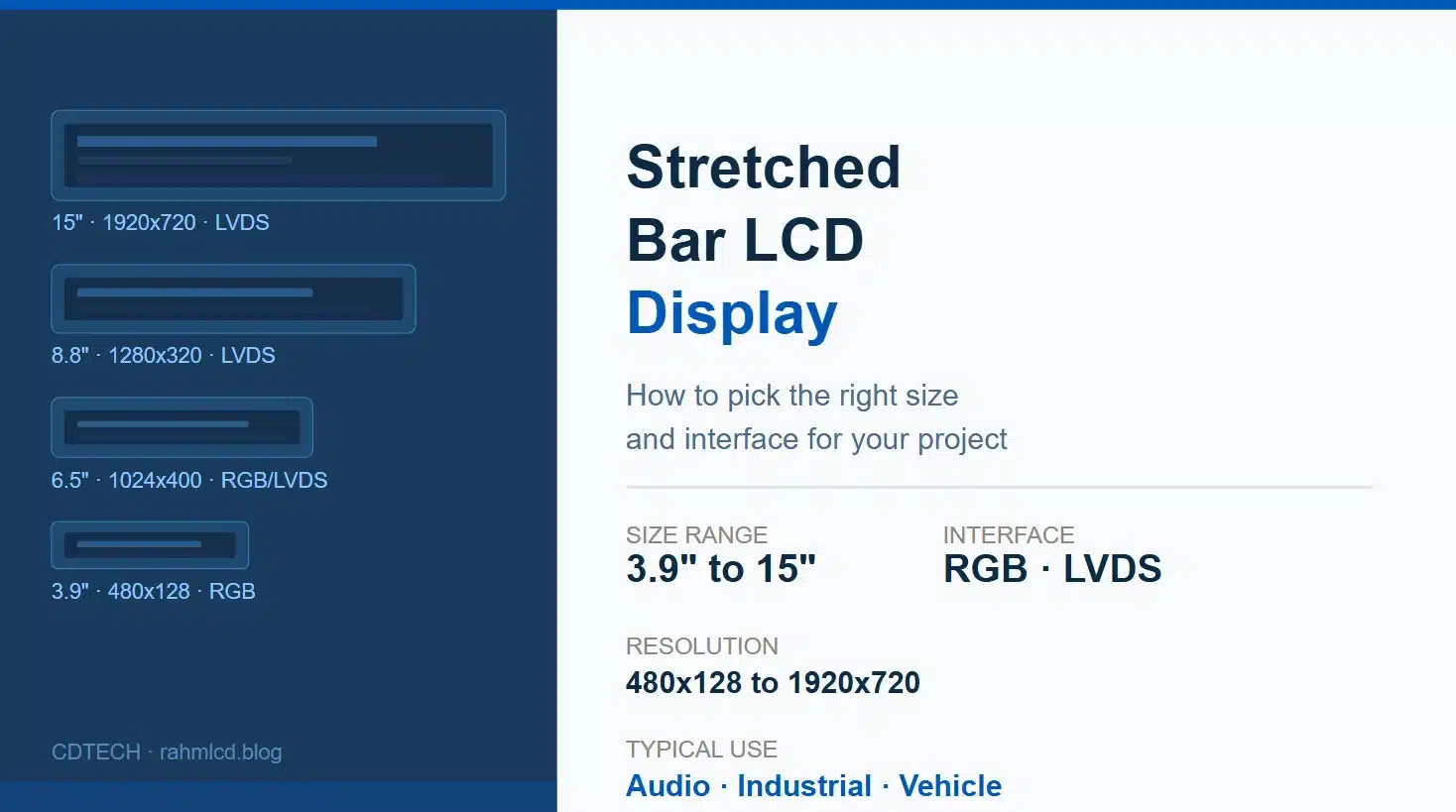
A bar LCD display is a stretched-format TFT panel with aspect ratios typically ranging from 3:1 to 8:1, used in audio equipment, industrial HMI, and vehicle dashboards where a standard rectangular display does not fit the enclosure.
You have already decided on a bar LCD display. The form factor is settled, the enclosure is drawn, and the aspect ratio is locked. What is not settled is which one: 3.9 inch or 8.8 inch, RGB or LVDS, 480×128 or 1280×320. That is the decision that actually takes time, and it is the one this article is about.
If you are earlier in the process and still evaluating whether a bar LCD display fits your project at all, 이 개요에서는 기본 사항과 일반적인 사용 사례를 다룹니다.. 인터페이스 유형, 터치 옵션 및 모듈 구조 방식을 포함하여 TFT LCD 모듈에 대한 광범위한 소개는 다음을 참조하십시오. 전체 TFT LCD 모듈 가이드. This article picks up after the bar LCD display decision is made.
화면에 실제로 표시해야 하는 내용부터 시작하세요.
Resolution is the first filter, and it is more useful than starting with size. A bar LCD display that shows three lines of status text and a progress bar has completely different requirements from one running a scrolling menu with icons and live waveform data.
The practical resolution bands for bar LCD displays break down like this. On the lower end, 320×120 and 480×128 are character and simple graphic territory. You can display text, basic icons, a few data fields. At 800×280, 800×320, and 1024×400 you are in the comfortable range for embedded UI with moderate detail: menus, status dashboards, audio controls. Jump to 1280×320 or 1920×720 and you are building something that genuinely needs pixel density, smooth rendering, and usually a more capable host processor to push it.
The mistake that comes up repeatedly is selecting resolution based on what looks impressive on paper rather than what the UI actually requires. A 1920×720 bar LCD display driven by an underpowered processor produces a worse result than an 800×320 panel driven well.
라인업 살펴보기
3.9인치, 480×128
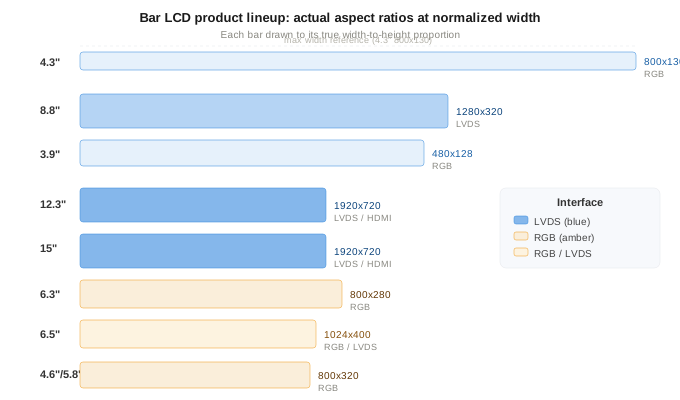
This is the entry point for functional bar LCD displays. Small enough to fit into audio equipment front panels, handheld devices, or narrow control strips. RGB interface, which means direct connection to most microcontrollers without a bridge chip. If your project is cost-sensitive, relatively simple in UI requirements, and constrained by space, this bar LCD display is often the answer. The limitation is resolution: 480×128 is not the place for detailed graphics or small fonts.
4.3인치, 800×130 및 5.8인치 또는 4.6인치, 800×320
The 800×130 is an unusual aspect ratio, very long and very thin. It suits applications where the bar LCD display strip is decorative as much as functional: audio level meters, thin status bars on appliances, indicator strips on industrial equipment. The 800×320 modules at 4.6 and 5.8 inch give you more vertical resolution to work with, which opens up proper menu navigation and multi-row data display. Both run on RGB, which keeps the integration straightforward.
6.3인치, 800×280 및 6.5인치, 1024×400
This is the range where a bar LCD display starts feeling like a real primary display rather than a supplementary strip. The 6.3 at 800×280 is RGB only, clean and simple. The 6.5 at 1024×400 gives you noticeably more pixel density and comes with both RGB and LVDS options, which makes it the first point in the lineup where the interface choice becomes a real decision rather than a default.
For audio equipment, the 6.5 inch bar LCD display is often the sweet spot: large enough to show waveforms, EQ curves, or track information clearly, small enough to fit into a standard rack-mount or desktop unit front panel. For industrial applications at this size, the LVDS option on the 6.5 is worth considering if the cable run is more than about 30 centimeters or if the environment has electrical noise.
8.8인치, 1280×320
This is the most requested bar LCD display size in the industrial segment. At 1280×320, you have enough horizontal resolution to display multiple data channels side by side, run a proper touchscreen interface, or show a wide process overview without scrolling. The interface is LVDS, which is not negotiable at this size and resolution combination: RGB at 1280×320 would require a wide parallel bus that becomes impractical on most embedded designs. LVDS keeps the cable count down and handles the bandwidth cleanly.
One thing worth knowing about the 8.8 inch bar LCD display: the physical length is significant. At roughly 217mm wide and 55mm tall, the mounting requirements are different from a standard rectangular display. The enclosure cutout is unusual enough that it often needs to be designed around the display from the start rather than retrofitted.
12.3인치 및 15인치, 1920×720
These are the large-format end of the bar LCD display range. At 1920×720, the pixel density is high enough for detailed UI, video content, or wide multi-zone layouts. LVDS is the primary interface here, with HDMI available on some variants for applications that need a plug-and-play connection to a host computer rather than an embedded driver board.
Industrial machine interfaces, vehicle dashboards, and wide-format information displays are the typical applications for a large bar LCD display at this size. The 15 inch variant in particular is less common in audio equipment simply because of physical scale: a 15 inch bar panel in a desktop audio unit would dominate the front face entirely.
RGB 대 LVDS: 요약 버전
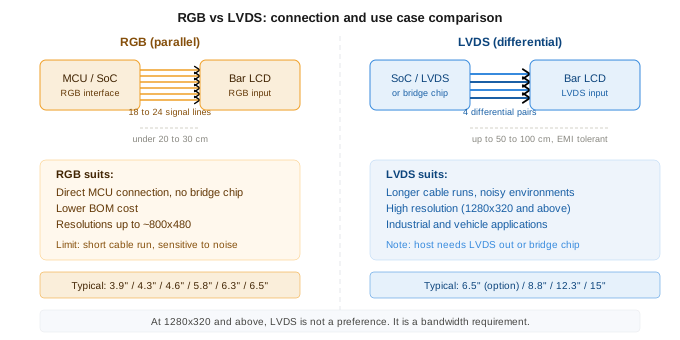
RGB is simpler. It connects directly to most microcontrollers and SoCs that have a parallel display interface. No bridge chip, no additional components, lower BOM cost. It works well for shorter cable runs on a bar LCD display, typically under 20 to 30 centimeters, and for resolutions up to about 800×480 in practical terms.
LVDS is more robust. It uses differential signaling, which means it handles longer cable runs and electrically noisy environments much better than parallel RGB. For any bar LCD display at 1280×320 and above, or for any installation where the display is more than 30 centimeters from the host board, LVDS is the more reliable choice. The cost is a slightly more involved integration: you need a host that outputs LVDS, or a bridge chip between your processor and the display.
사양을 확정하기 전에 답변해야 할 질문들
- What does the UI actually need to display? Run through the densest screen in your interface and count the elements. This tells you the minimum resolution you need for your bar LCD display, not the maximum you can afford.
- 최종 조립에서 디스플레이와 호스트 보드의 거리는 얼마나 되나요? 20cm 미만에서는 RGB가 좋습니다. 30cm 이상 또는 시끄러운 환경에서는 LVDS로 기울이세요.
- 프로세서 또는 SoC에 기본 LVDS 출력이 있습니까, 아니면 브리지 칩이 필요합니까? 이 경우 BOM과 레이아웃이 크게 변경됩니다.
- Is touch required? Not all bar LCD display modules come with touch panel options. Confirm availability for the specific size and interface combination you are considering.
- What are the mounting constraints? Bar LCD displays have unusual aspect ratios that affect bracket design, bezel clearance, and FPC routing. The FPC exit direction in particular is worth confirming early, since changing it after tooling is expensive. For more on FPC customisation lead times, see our guide on 맞춤형 LCD 모듈 개발.
If you have a specific bar LCD display size and application in mind and want to confirm the right interface and resolution combination, share the details and we can give you a direct answer based on what we have shipped for similar projects. 여기에서 문의하세요.

 한국어
한국어  English
  Español
  日本語
日本語
답글쓰기