When you spend enough time sourcing displays for industrial equipment, one size keeps coming up in BOMs and spec sheets: 10.1 inch. It shows up in smart lockers, medical terminals, factory HMIs, marine instruments, and portable test gear, across LVDS, MIPI, and HDMI adapter board variants. But it is not immediately obvious why this size, specifically, became the default pick for so many embedded systems.
This article walks through what makes a 10.1 inch LCD display the industrial workhorse it is: which interfaces make sense for which applications, what resolution options are actually available, how temperature grades affect long-term reliability, and the integration details that trip people up in production. I will reference real project scenarios the team I work with at CDTECH has handled, keeping names and specifics anonymized, but the engineering takeaways are real.
Why 10.1 Inch Is the Default Size in Industrial Terminals
There is no committee that declared 10.1 inch the standard. It earned that position through supply chain mechanics, mechanical compatibility, and interface availability.
First, the glass supply. Multiple panel glass fabs run dedicated 10.1 inch lines, which means steady availability and competitive pricing. When we recommend a 10.1 inch LCD display for a new design, we are not betting on a niche glass that might disappear in two years. The substrate lines serving a 10.1 inch LCD display are among the most mature in the industry.
Second, enclosures. Standard industrial enclosure families from the usual manufacturers include cutout and mounting patterns for 10.1 inch panels. Engineers can design around this size without committing to a custom mechanical assembly, which shortens the BOM and simplifies sourcing. A 10.1 inch display module will drop into more off-the-shelf housings than an 11.6 inch or 9.7 inch module ever will.
Third, interface breadth. At 10.1 inch, you can find modules with LVDS, MIPI DSI, and HDMI adapter board options from the same supplier. This is not true at smaller sizes, where MIPI and RGB dominate, or at larger sizes, where eDP takes over. The 10.1 inch slot sits at the intersection of all major embedded interfaces, which gives engineers flexibility when the host platform changes mid-design.
Fourth, the size-to-visibility balance. A 7 inch display works for compact handhelds and single-gauge replacements. A 15.6 inch panel suits a control room console. The 10.1 inch sits in the middle: large enough for a touch-driven HMI with multiple data fields, small enough to fit in a wall-mounted terminal, a smart cabinet door, or a portable instrument case. It is the general-purpose platform size for embedded display applications.
Interface Options for 10.1 Inch Displays
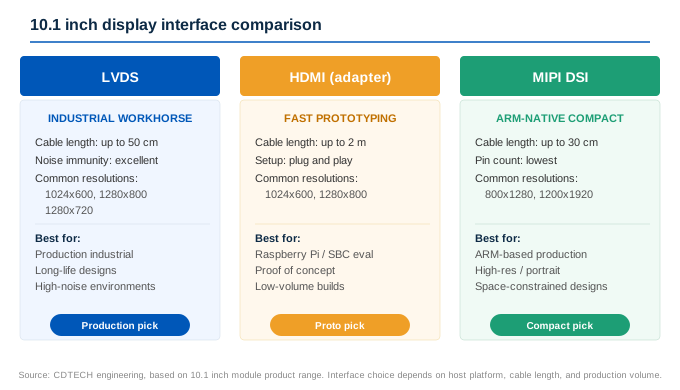
One reason 10.1 LCD module industrial designs are so common is that this size supports all three major embedded interfaces. Which one you pick depends on your host processor, cable length, and whether you are prototyping or moving to production.
LVDS: The Industrial Workhorse
For production designs, a 10.1 inch LCD display with LVDS interface is the most common choice. LVDS handles cable runs up to 50 cm with good noise immunity, operates at low voltage swing (typically 350 mV differential), and is well-supported by industrial-grade SoCs from NXP, TI, and Renesas. At 1280×800 resolution, a single LVDS link (4 data pairs + 1 clock pair) is sufficient. If you are building equipment that will be manufactured for 3 to 5 years, LVDS is the safest starting point.
CDTECH carries several 10.1 inch LVDS modules: the S101HWX33HD (1280×800, 500 nits, -20 to 70 degrees C), the S101HWX34HD/ED (1280×800, 500 or 1000 nits), and the S101HWX53ED (1280×800, 1000 nits, -30 to 80 degrees C) for higher-temperature environments. For 1024×600, the S101QWS74HD offers LVDS at 500 nits.
HDMI Adapter Board: Fast Prototyping, Not Always Production-Ready
Many Raspberry Pi and SBC developers reach for a 10.1 inch LCD display with HDMI first because it boots up with zero driver work. An adapter board converts HDMI to the panel’s native LVDS or MIPI interface. For bench testing and proof-of-concept builds, this is the fastest path to a working screen.
The trade-off: adapter boards add a PCB, a connector, and a potential point of failure that a direct LVDS or MIPI connection avoids. For production volumes, moving from HDMI adapter to a direct interface typically reduces the BOM, eliminates an assembly step, and gives you control over the backlight driver and touch controller firmware.
MIPI DSI: Compact, High-Resolution, ARM-Native
MIPI DSI is the default display interface on most ARM application processors. It uses fewer pins than LVDS and supports high resolutions at lower power. For 10.1 inch designs driven by i.MX, Rockchip, or Qualcomm platforms, MIPI can be a cleaner fit than LVDS, eliminating the need for an LVDS bridge chip on the host side.
CDTECH offers several 10.1 inch MIPI modules: the S101BWX42NP (800×1280 portrait, 400 nits), the S101BWX49EP (800×1280, 750 nits), and the S101QWU65HP (1200×1920, 600 nits). The higher pixel density MIPI panels are well-suited for medical instruments and test equipment where fine detail matters.
| 인터페이스 | 가장 적합한 | Cable Length | Typical Resolutions at 10.1″ |
|---|---|---|---|
| LVDS | Production industrial, long cable runs | Up to 50 cm | 1024×600, 1280×800, 1280×720 |
| HDMI (adapter) | Prototyping, SBC evaluation, low volume | Up to 2 m (HDMI side) | 1024×600, 1280×800 |
| MIPI DSI | ARM-based production, compact designs | Up to 30 cm | 800×1280, 1200×1920 |
Resolution Options: From 800×480 to 1920×1200
The 10.1 inch class covers a wider resolution range than most engineers expect. Choosing the right 10.1 inch LCD display resolution depends less on what is technically available and more on what your UI framework, graphics pipeline, and budget can support.
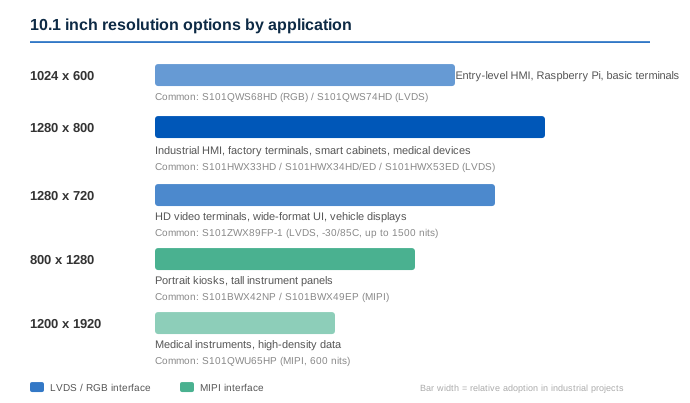
1024×600 is the most common resolution you will see on off-the-shelf 10.1 inch TFT display modules aimed at Raspberry Pi and general embedded use. It is a comfortable fit for simple HMIs: a few data readouts, some buttons, maybe a status graph. The S101QWS68HD (RGB, 500 nits) and S101QWS74HD (LVDS, 500 nits) both use this resolution.
1280×800 (WXGA) is the sweet spot for industrial HMI. Text renders cleanly at this density on a 10.1 inch panel, and most embedded GUI frameworks handle WXGA without scaling issues. The S101HWX33HD and S101HWX34HD/ED modules from CDTECH use this resolution with LVDS. If your UI includes tables, schematics, or dense status screens, the jump from 1024×600 to 1280×800 is noticeable in daily use.
1920×1200 (WUXGA) is available at 10.1 inch but comes with a higher price tag and usually requires a dual-link LVDS or MIPI interface. It is overkill for most HMI applications, but medical imaging devices and precision inspection instruments benefit from the extra pixel density. CDTECH’s S101QWU65HP runs 1200×1920 (portrait orientation) over MIPI at 600 nits.
800×480 is still available at 10.1 inch, though it looks noticeably coarse at this panel size. I only recommend it for legacy drop-in replacements where the UI was originally developed for that resolution and reworking it is not in the budget.
| 해결 | 종횡비 | 일반 인터페이스 | Best Application |
|---|---|---|---|
| 1024×600 | ~16:9 | RGB, LVDS | Simple HMI, Raspberry Pi projects, basic terminals |
| 1280×800 | 16:10 | LVDS | Industrial HMI, factory terminals, smart cabinets |
| 1280×720 | 16:9 | LVDS | HD video-capable terminals, wide-format UI |
| 800×1280 | 10:16 (portrait) | 미피 | Portrait-mode kiosks, tall instrument panels |
| 1200×1920 | ~10:16 (portrait) | 미피 | Medical instruments, high-density data displays |
Standard vs. High-Temperature Grades
Temperature rating is one of those specs that gets skimmed over in the datasheet review and then causes field failures two summers later. For a 10.1 inch LCD display going into an enclosed terminal, the internal ambient can easily run 15 to 20 degrees C above the external ambient. A panel rated for 70 degrees C in a 50 degrees C outdoor enclosure is already at its limit with no margin.
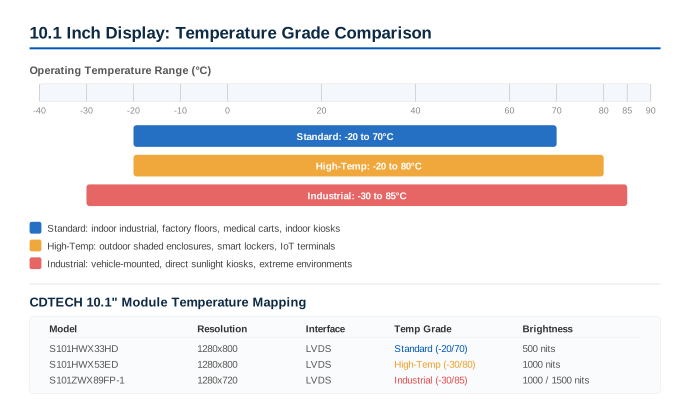
Standard-grade 10.1 inch LCD display modules typically operate from -20 to 70 degrees C. This covers most indoor industrial environments: factory floors, test labs, indoor kiosks, and medical carts. High-temperature versions extend the upper limit to 80 or 85 degrees C, achieved through different liquid crystal formulations, higher-temperature polarizer materials, and LED backlight derating curves that keep the junction temperatures within spec.
CDTECH’s 10.1 inch LCD display lineup includes both standard and extended-temperature options. The S101HWX53ED (1280×800, LVDS, 1000 nits) operates from -30 to 80 degrees C. The S101ZWX89FP-1 (1280×720, LVDS, up to 1500 nits) spans -30 to 85 degrees C, making it suitable for vehicle-mounted and outdoor kiosk applications where both brightness and temperature range are non-negotiable.
Touch Integration: The Voltage-Level Trap
If I had to pick the single most common integration issue with 10.1 inch LCD display modules that include touch, it is not the touch driver, not the I2C address conflict, and not the firmware. It is the logic voltage on the touch controller’s control lines.
Here is the scenario from an actual project in Spain, mentioned briefly above. The customer designed a 10.1 inch HDMI-based system. Display worked out of the box. Touch did not respond at all. After swapping cables, reflashing the OS, and testing the touch panel on a separate eval board (where it worked fine), the problem was traced to the customer’s schematic. A resistor divider intended to level-shift the RST and INT signals was dropping them to 1.3 V. The touch IC datasheet specified a minimum logic-high voltage of 1.8 V. Below that threshold, the IC never came out of reset.
The fix was straightforward once identified: adjust the divider ratio or use a proper level shifter. But it cost the team a full engineering day, and it could have been avoided with a simple check during schematic review.
- Verify the touch IC VDDIO voltage. Some touch controllers are 1.8 V I/O, others are 3.3 V. They are not interchangeable without level shifting.
- Check RST and INT pin logic levels against the host GPIO voltage. A 3.3 V host driving a 1.8 V touch IC without a level shifter will eventually damage the IC.
- Confirm I2C pull-up voltage matches the touch IC VDDIO, not the host VDDIO.
- Measure signal timing: some touch ICs require a minimum RST pulse width and a settling delay after power-up before the I2C bus is ready.
This issue is not unique to any one brand or supplier. It is a physics problem: the touch IC and the host processor are often specified by different teams, and the interface between them sits in the “someone else will check it” zone. If you are integrating a 10.1 inch display module with touch, make the logic-level verification an explicit line item in the design review checklist.
EOL Planning for 10.1 Inch Modules
Industrial products live longer than consumer products. A smart locker, a machine tool HMI, or a medical terminal can stay in production for 5 to 10 years. A 10.1 inch LCD display in one of these products will likely go EOL during that window. The question is whether an EOL notice means a full redesign or a manageable revision.
For a 10.1 inch display replacement scenario, three factors determine how painful the transition will be: mechanical compatibility (outer dimensions, mounting holes, connector position), interface compatibility (same protocol, same pin mapping, same timing), and optical compatibility (same resolution, similar color gamut, similar brightness). The more of these you can lock in early, the less an EOL notice hurts. For more detail on this topic, see our guide to LCD display EOL replacement.
Volume and Pricing: Small Batches Are Viable
Not every project starts at volume. Some begin with a small trial. A 10.1 inch LCD display order at 306 pieces, which we handled as a trial production run for a portable device project in the UK, carried a notably higher unit price than the standard 500-piece MOQ order. That is the reality of TFT panel manufacturing: the glass cost is similar, but the assembly line setup, test fixture time, and logistics overhead get amortized over fewer units. Orders below 500 pieces are treated as 1 to 2 trial batches before stepping up to regular production volume.
The practical takeaway from the UK case: trial batches are available and useful for pilot runs, but the customer should plan to reach the 500-piece MOQ for subsequent production batches to bring the unit cost down. If you know you will need 1,500 units over 18 months, ordering them in three batches of 500 costs less than five batches of 300. If cash flow makes batching difficult, discuss the production schedule with the supplier upfront. Some suppliers, including the team I work with at CDTECH, can hold partial inventory against a scheduled delivery plan, which lets you capture the volume price while spreading out the delivery and payment.
Factors that move the unit price on a 10.1 inch LCD display include resolution (1024×600 vs. 1280×800), interface (RGB vs. LVDS vs. MIPI), touch type (none, capacitive, resistive), brightness tier (standard 500 nits vs. 1000 nits sunlight-readable), and temperature grade (standard vs. high-temp). A standard 1024×600 LVDS module without touch will be at the lower end of the range; a 1280×800 high-brightness high-temp variant with capacitive touch and optical bonding will be at the upper end.
What to Expect When You Inquire: A Supplier’s Timeline
For most industrial projects, sourcing a 10.1 inch LCD display takes a few weeks to a few months from first inquiry to sample order, depending on how standard the configuration is and how much customization is involved.
Medical and compliance-driven customers follow a longer timeline. I recall a medical device manufacturer in Germany that took over six months from first contact to sample PO. Before they would place any order, they required the supplier to sign a code of conduct, provide RoHS and REACH documentation, submit a conflict minerals reporting template, and complete a quality system audit. This was not bureaucracy for its own sake; it was a regulated supply chain requirement that they could not skip. The sample order itself was small, just evaluation units, but the qualification process was thorough.
- RoHS and REACH compliance certificates
- Conflict minerals reporting (CMRT)
- ISO 9001 or equivalent quality management system certification
- Product reliability test reports (thermal cycling, high-temp/high-humidity storage, ESD)
- PCN (Product Change Notification) policy documentation
If your project falls under medical device regulations, plan for this lead time when building the project schedule. An extra three to six months for supplier qualification is common. For more on this topic, read our article on LCD displays for medical devices.
Working on a project that needs a 10.1 inch LCD display in a specific configuration? Whether it is a standard LVDS module, a high-temperature variant, or a custom touch integration, I am happy to help figure out what works best for your application. 연락처: [email protected]
자주 묻는 질문
What is the difference between a 10.1 inch HDMI display and a 10.1 inch industrial display module?
HDMI 디스플레이는 온보드 HDMI 수신기 IC가 장착되어 있으며 SBC 또는 PC에 연결할 준비가 되어 있습니다. 산업용 10.1인치 LCD 디스플레이 모듈은 패널의 기본 LVDS, RGB 또는 MIPI 인터페이스를 직접 노출하여 백라이트 드라이버와 터치 펌웨어를 제어할 수 있지만 호스트 프로세서가 호환 가능한 디스플레이 컨트롤러를 갖추어야 합니다. 생산을 위해서는 직접 인터페이스 모듈이 일반적으로 더 나은 선택이며, 프로토타입을 위해서는 HDMI 버전이 더 빠르게 작동하는 화면을 제공합니다.
Can I replace a 10.1 inch display in my existing device with any 10.1 inch module?
아니요. 대각선 크기가 동일하더라도 기계적 윤곽, 장착 구멍 위치, 커넥터 위치 및 인터페이스 핀 배치가 모듈 간에 다릅니다. 10.1인치 디스플레이 교체는 최소한 활성 영역, 외부 치수, 인터페이스 프로토콜, 핀 매핑 및 백라이트 전압 범위를 일치시켜야 합니다. 관리된 교체가 어떻게 생겼는지에 대한 실제 예는 위의 EOL 섹션을 참조하십시오.
What resolution is best for a 10.1 inch industrial HMI?
1280×800 (WXGA) LVDS는 산업용 HMI에 사용되는 10.1인치 LCD 디스플레이의 가장 일반적인 구성입니다. 이는 읽기 쉬운 텍스트와 깔끔한 UI 요소를 제공할 만큼의 픽셀 밀도를 제공하며, 듀얼 링크 LVDS 설정이나 고급 그래픽 파이프라인을 요구하지 않습니다. 1024×600은 더 간단한 인터페이스에 적합하며 더 낮은 가격대에서 더 널리 사용 가능합니다.
Do I need a high-temperature 10.1 inch display if my device is used outdoors but in a shaded enclosure?
Measure the internal temperature of the enclosure at the panel surface on the hottest day you expect, then add margin. A shaded enclosure in a 40 degrees C ambient can still reach 55 to 60 degrees C internally from solar radiation and electronics heat. If your measurement plus margin approaches 70 degrees C, spec a high-temp version. The cost difference between standard and high-temp at 10.1 inch is modest compared to a field failure.
What is the typical MOQ for a custom 10.1 inch TFT display module?
For 10.1 inch modules, the standard MOQ at CDTECH is 500 pieces. Orders below 500 are treated as trial production runs, typically limited to 1 or 2 batches, which carry a higher unit cost. For a fully custom FPC, custom cover glass, or custom backlight design, the MOQ stays at 500 but the NRE is additional. If your project is still in the prototyping or pilot phase, smaller trial quantities are available; just plan for the step-up to 500 once you move into regular production.

 한국어
한국어  English
  Español
  日本語
日本語
답글쓰기