If you have spent any time sourcing a TFT LCD for an embedded design, you have probably run into the usual interfaces: MCU, RGB, LVDS. But more and more industrial designs are moving to something else: the MIPI display module. It uses fewer pins than RGB, takes up less board space than LVDS, and handles high resolutions with ease. Yet when engineers first encounter MIPI DSI, two things happen: they either assume it is only for smartphones, or they get tripped up on lane counts, bandwidth math, and compatibility. Neither needs to be the case.
This guide walks through what a MIPI display module actually is, when it beats LVDS and RGB in an industrial design, how to read the key specs, and what the real-world product landscape looks like from 4.0 inches to 12.3 inches. Along the way, I will share specific module examples from the team I work with at CDTECH, so you can see what is available and how these specs connect to actual projects.
What Is a MIPI Display Module?
MIPI stands for Mobile Industry Processor Interface. The display variant, MIPI DSI (Display Serial Interface), is a high-speed serial protocol that connects a host processor to a display panel. Unlike parallel interfaces such as RGB that need 20 to 28 signal lines, MIPI DSI uses differential pairs, typically 2 to 8 data lanes plus a clock lane, to push pixel data over a much thinner, more compact connection.
A MIPI display module is simply a TFT LCD module that uses MIPI DSI as its primary video interface. Inside the module, a bridge IC or a MIPI-compatible driver IC receives the serial data, deserializes it, and drives the LCD panel. To you as the system integrator, the interface is the differentiator: a small, low-pin-count FPC connector instead of a wide parallel ribbon cable.
MIPI DSI is distinct from MIPI CSI (Camera Serial Interface). DSI is for displays, CSI is for cameras. They share the same physical layer (D-PHY) but the protocol layers differ. For this article, we are only talking about MIPI DSI display modules.
MIPI Lane Configuration: 1-Lane, 2-Lane, and 4-Lane
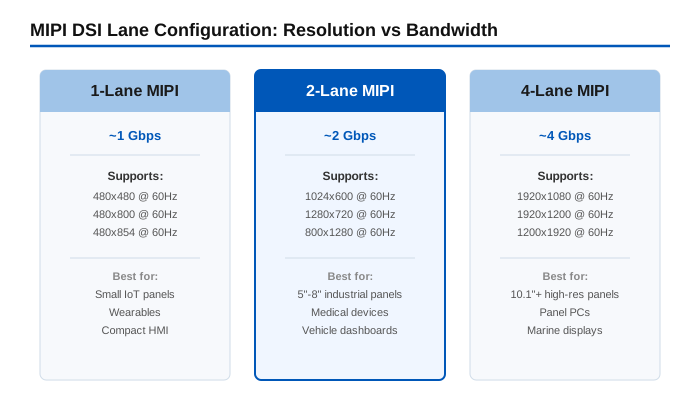
Each MIPI data lane is a differential pair that can deliver up to 1 Gbps per lane in D-PHY v1.0 (higher in newer versions). The total bandwidth determines the maximum resolution and refresh rate the interface can support:
- 1-lane MIPI: Enough for small panels up to 480×480 or 480×800 at 60 Hz. Minimal pin count, good for wearables and compact IoT HMIs.
- 2-lane MIPI: Handles 720p (1280×720) at 60 Hz comfortably. This is the sweet spot for most 5-inch to 8-inch industrial modules.
- 4-lane MIPI: Required for 1920×1080 at 60 Hz or 1920×1200. Used in 10.1-inch and larger high-resolution panels.
MIPI vs LVDS vs RGB: Which Interface Should You Choose?
I wrote a detailed guide on LVDS display modules earlier. If you are choosing between MIPI and LVDS for an industrial design, here is the short version: LVDS wins on cable length and noise immunity for long runs; MIPI wins on connector size, pin count, and power efficiency for compact designs. RGB is still around for simple MCU-driven panels, but it tops out at lower resolutions and needs a lot of GPIO.
The table below gives you a direct comparison:
| Parameter | MIPI DSI | LVDS | RGB (Parallel) |
|---|---|---|---|
| Signal type | Serial differential | Serial differential | Parallel single-ended |
| Typical pin count | 6-12 (2-4 lanes) | 10-20 (single/dual link) | 24-28 |
| Max practical resolution | 1920×1200 @ 60Hz | 1920×1080 @ 60Hz | 800×480 @ 60Hz |
| Max cable/flex length | 30 cm (typical) | 1-2 m | 15-20 cm |
| EMI performance | Good (differential) | Excellent | Poor (many parallel lines) |
| Power consumption | Low | Moderate | Moderate-high |
| Connector size | Smallest | Small | Large |
| Best for | Compact embedded, IoT, handheld | Industrial control, long cable runs | Simple MCU-driven HMI |
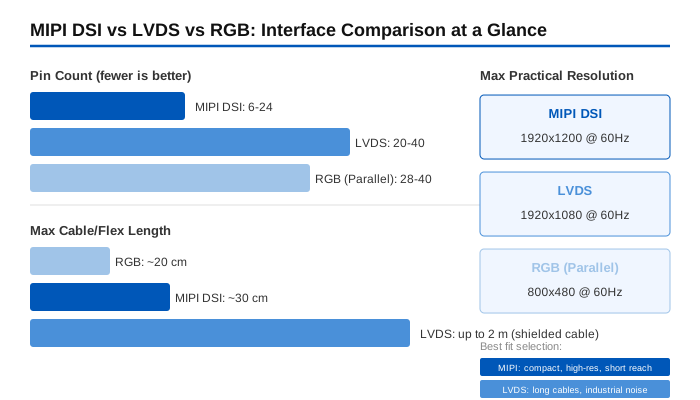
If your enclosure is tight on space, MIPI is almost always the better choice. The FPC connector on a MIPI module can be as small as 0.3 mm pitch with 10-15 positions, versus a 40-pin 0.5 mm pitch connector for a typical RGB module. That space saving matters when you are designing a handheld barcode scanner or a compact IoT panel.
That said, if you need to run a display cable across a machine cabinet over 50 cm, stick with LVDS. MIPI was not designed for long cable runs, and signal integrity degrades quickly beyond roughly 30 cm on a standard FPC.
Key Specifications When Selecting a MIPI Display Module
Once you have decided on MIPI as the interface, there are five specs you need to lock down before comparing products:
Resolution and Lane Compatibility
Make sure your processor’s MIPI DSI output resolution matches the panel’s native resolution. Unlike LVDS, where the bridge IC can often handle scaling, many MIPI panels expect pixel-perfect input. Check both the lane count and the pixel clock: a 4-lane MIPI output from your SoC can drive a 2-lane panel (at reduced bandwidth), but not the other way around.
Brightness: Know Your Environment
Brightness tiers for industrial MIPI modules generally fall into three categories:
- Standard indoor (300-500 nits): Factory floors with controlled lighting, indoor medical devices, embedded terminals inside enclosures.
- High brightness (700-1000 nits): Bright shop floors, near-window installations, semi-outdoor kiosks, vehicle-mounted displays.
- Sunlight readable (1000 nits and above): Direct sunlight exposure, outdoor handhelds, agricultural equipment dashboards.
For more on brightness selection, see my article on what nits numbers actually mean for outdoor applications.
Operating Temperature Range
Standard industrial modules are rated for -20 degrees C to 70 degrees C. Higher-grade modules push to -30 degrees C to 85 degrees C. If your device sits in a vehicle dashboard under summer sun or inside an unheated outdoor enclosure in winter, go for the wide-temperature option. The LCD itself survives those extremes, but the backlight LED lifetime drops sharply at sustained high temperatures, so factor that into your thermal design.
Panel Type: IPS vs TN
For industrial MIPI modules, IPS is the default recommendation. It gives you 80-degree or better viewing angles in all directions, which matters when an operator is not looking at the screen head-on. TN panels are still available at lower cost, but the viewing angle limitation, especially in the vertical direction, can be a problem for wall-mounted or angled installations.
Touch Panel Integration
Most MIPI display modules can be supplied with a capacitive touch panel (CTP) pre-integrated. The touch controller typically communicates over I2C, completely separate from the MIPI video interface. If you need glove-compatible or wet-environment touch, specify that upfront, resistive touch panels (RTP) remain an option for those conditions.
MIPI Display Module Size-by-Size Selection
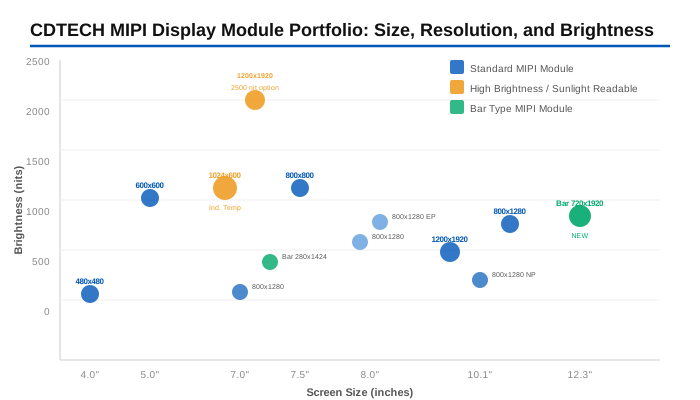
Below is a reference table of MIPI display modules available from CDTECH, organized by size. All models use IPS panels and MIPI DSI interface. This is not a catalog of everything on the market, it is a real product line I work with, so the specs are accurate.
| 크기 | 모델 | 해결 | 명도 | Temp Range | Best Fit |
|---|---|---|---|---|---|
| 4.0″ | S040HWV09NN | 480×480 | 300 nits | -20/70°C | Compact IoT panels, handheld HMIs |
| 5.0″ | S050QWS115EN | 600×600 | 900 nits | -20/70°C | Bright industrial handhelds, test equipment |
| 7.0″ | S070QWS145EP | 1024×600 | 1000니트 | -30/85°C | Vehicle dashboards, outdoor control panels |
| 7.0″ | S070HWX73NP/HP | 800×1280 | 320/450 nits | -20/70°C | Portrait-mode medical UI, indoor HMI |
| 7.0″ | S070QWU142FN | 1200×1920 | 1500/2500 nits | -20/70°C | Sunlight-readable high-res, outdoor kiosk |
| 7.5″ | S075BWX01EP | 800×800 | 1000니트 | -20/70°C | Square-format industrial monitors |
| 8.0″ | S080BWX16NP/EP | 800×1280 | 400/700 nits | -20/70°C | Embedded terminals, medical UI |
| 10.1″ | S101QWU65HP | 1200×1920 | 600 nits | -10/60°C | High-res panel PCs, indoor kiosk |
| 10.1″ | S101BWX42NP | 800×1280 | 400 nits | -20/70°C | Standard industrial terminals |
| 10.1″ | S101BWX49EP | 800×1280 | 750 nits | -20/70°C | Bright industrial monitors, marine displays |
For the 4.0-inch to 5.0-inch range, MIPI modules are typically driven by mid-range ARM Cortex-A or Cortex-M processors with a 2-lane DSI output. The compact FPC connector means you can fold the flex cable into a tight enclosure without worrying about a wide parallel ribbon.
At 10.1 inches, MIPI really shines for high-resolution designs. The 1200×1920 panels push a lot of pixels, and MIPI’s serial architecture handles that cleanly with 4 lanes. An LVDS equivalent would need dual-link LVDS, doubling the connector size and cable routing complexity.
MIPI Bar Type Displays: When a Rectangle Will Not Fit
Not every design has room for a standard 16:9 or 4:3 display. For narrow dashboard strips, shelf-edge displays, or information bars on industrial equipment, a MIPI bar type display can be the right answer.
CDTECH offers two MIPI bar type modules that cover different orientations:
- 7.0″ Bar (S070HWX93HN): 280×1424 resolution in a vertical strip format, 550 nits brightness. This is a portrait-oriented bar, ideal for side-panel information displays on medical carts or industrial equipment where the UI needs to show status information in a tall, narrow column.
- 12.3″ Bar (S123HWU14EP): 720×1920 resolution in a vertical format, 800 nits brightness. This is a new addition with a larger form factor, good for panel-PC sidebars, vehicle center-stack information strips, and digital shelf labels with rich content.
Both use MIPI DSI, which is particularly useful for bar type panels because the non-standard resolutions (280×1424, 720×1920) are easier to configure over MIPI than over LVDS, where you would need a bridge chip that explicitly supports those oddball timings.
Customization Options for MIPI Display Modules
Off-the-shelf modules are a good starting point, but real industrial projects often need something specific. Here are the customizations we handle most often at CDTECH for MIPI display modules:
- Brightness upgrade: Adding LED rows to push a standard 300-nit panel to 700 or 1000 nits. The MIPI interface stays the same; only the backlight driver and LED configuration change.
- Optical bonding: Laminating a cover glass directly to the LCD surface with OCA (optically clear adhesive). Eliminates the air gap, reduces internal reflections, and noticeably improves sunlight readability without increasing backlight power.
- Touch panel integration: Adding a capacitive touch panel with an I2C-connected controller. The touch and display interfaces are independent, so the MIPI video path is unaffected.
- Custom FPC length and connector: Extending or shortening the FPC tail, changing connector type or position for a better mechanical fit in your enclosure.
- Cover glass treatment: Anti-glare (AG), anti-reflective (AR), or anti-fingerprint (AF) coatings on the cover glass surface.
- Driver board: HDMI-to-MIPI or LVDS-to-MIPI adapter boards when your host system does not have a native MIPI DSI output.
These customizations do not require a new panel design. They are configuration changes to the module assembly, which keeps the lead time shorter than a full custom LCD development. MOQ for MIPI modules at CDTECH starts at 1,000 pieces (500 pieces for 10.1-inch and above). Pilot samples are available for evaluation before committing to production.
Making Sense of the MIPI Module Landscape
The MIPI display module category has evolved well beyond its smartphone origins. Today, you can find industrial-grade MIPI panels from 4.0 to 12.3 inches, with brightness options reaching 2500 nits and temperature ranges going from -30 to 85 degrees C. The interface is no longer a niche choice: it is a practical alternative to LVDS and RGB for compact, high-resolution embedded designs.
The key is matching your processor’s MIPI DSI output (lane count, resolution, pixel clock) to the right module, then locking in the brightness, temperature grade, and touch configuration your application actually needs. The CDTECH line covers most of the common industrial sizes, and the customization options fill in the gaps for projects that need something beyond a catalog part.
Working on a project that needs a specific MIPI display size or configuration? Feel free to reach out. I am happy to help figure out what works best for your application. 연락처: [email protected]
자주 묻는 질문
What is the difference between MIPI DSI and LVDS?
Both are serial differential interfaces, but MIPI DSI uses fewer pins (6-12) and is optimized for short-reach connections inside a device. LVDS supports longer cable runs (up to 2 meters) and is the established industrial standard. For compact, high-resolution designs under 30 cm cable length, MIPI DSI is usually the better fit. For long runs across a machine cabinet, LVDS wins. See the comparison table in the section above for the full breakdown.
How many MIPI lanes do I need for my display resolution?
As a rule of thumb: 1 lane for up to 480×800 at 60 Hz, 2 lanes for 720p at 60 Hz, 4 lanes for 1080p at 60 Hz. But the real answer depends on your pixel clock, color depth (16-bit vs 24-bit), and refresh rate. Multiply resolution width x height x frame rate x bits per pixel, then divide by lane count and compare to the per-lane bandwidth your D-PHY version supports.
Can I use a MIPI display in an outdoor industrial application?
Yes, provided you choose a module with high brightness (1000 nits or above) and optical bonding. The CDTECH S070QWU142FN 7.0-inch module at 1500 or 2500 nits with MIPI DSI is an example of a display built for direct-sunlight applications. Pair it with a wide-temperature backlight and an AG-coated cover glass for best results.
What MOQ should I expect when sourcing industrial MIPI modules?
For standard off-the-shelf MIPI modules up to 8.0 inches, MOQ starts at 1,000 pieces. For 10.1-inch and larger modules, MOQ starts at 500 pieces. For customized variants with brightness upgrades, specific FPC configurations, or optical bonding, the same thresholds apply. At CDTECH, we are open to small pilot runs for evaluation before committing to production volumes.
Do MIPI displays support touch panel integration?
네. 터치 컨트롤러는 MIPI DSI 비디오 레인과 완전히 분리된 I2C 또는 SPI를 통해 통신합니다. 거의 모든 MIPI 디스플레이 모듈에 정전식 터치 또는 저항식 터치를 추가할 수 있습니다. 두 인터페이스는 서로 간섭하지 않습니다. 터치 기술 선택에 대한 자세한 내용은 산업용 터치 스크린 모니터 지정 가이드를 참조하십시오.

 한국어
한국어  English
  Español
  日本語
日本語
답글쓰기